Quick Practice Test
Type the phrase below · Instant WPM + accuracy · Simulates real job tests
Click here and type the words to check your speed
Practice on the keyboard the job will actually use — mechanical keyboards build accuracy fast
EMPLOYMENT TYPING TEST
Preparing for a typing test for a job interview? Practice with Kwerty's free employment typing test. Get instant WPM and accuracy scores, see the exact speed employers require for your role, and walk into your assessment with confidence.
The same timed format used in real pre-employment typing assessments. Practice as many times as you need.
Simulates real employment typing assessments — no account required
IN THIS GUIDE
WHAT IS AN EMPLOYMENT TYPING TEST?
Understanding what you'll face in the hiring process
An employment typing test (also called a pre-employment typing assessment) is a timed test that measures how fast and accurately you can type. Employers use these tests to verify that job candidates can meet the typing speed requirements for the position.
During the test, you'll be given text to type for a set period — usually 1 to 5 minutes. Your results show two key metrics: words per minute (WPM) and accuracy percentage. Both matter for passing.
Employment typing tests are common for data entry, administrative, transcription, dispatch, government, and customer service positions. Some companies administer the test in-person during the interview, while others send a link to an online assessment.
The best way to prepare is to practice with a tool that matches the test format. Kwerty's free typing speed test uses the same timed format as real employment assessments — take as many practice tests as you need, completely free.
WPM REQUIREMENTS BY JOB
How fast you need to type for each profession
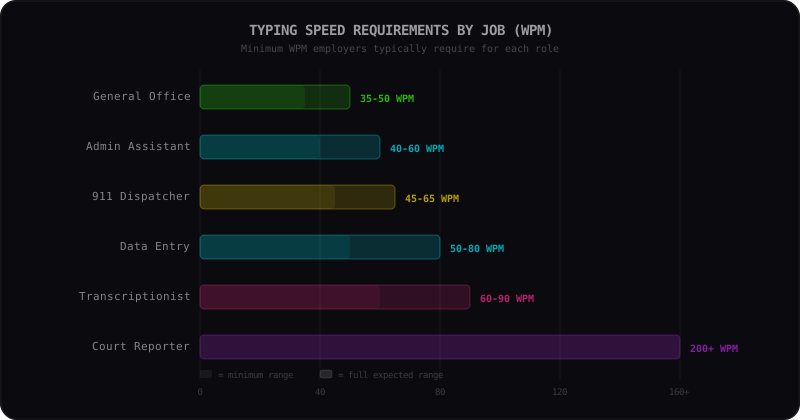
DATA ENTRY CLERK
Data entry clerks spend the majority of their day inputting information into databases and spreadsheets. Speed and accuracy are equally important since errors can cascade through entire systems. Most employers expect a minimum of 50 WPM, but competitive candidates type at 65-80 WPM.
TRANSCRIPTIONIST
Medical and legal transcriptionists convert audio recordings into written documents. They need high speed to keep up with natural speech patterns and exceptional accuracy since transcription errors can have serious consequences. Specialized vocabulary knowledge is also essential.
ADMINISTRATIVE ASSISTANT
Administrative assistants handle correspondence, reports, and scheduling. While they do not type continuously, they need solid speed for drafting emails, meeting notes, and documents. A comfortable 50 WPM with good accuracy is the sweet spot for most admin roles.
DISPATCHER (911 / EMERGENCY)
Dispatchers must type quickly while simultaneously listening to callers and coordinating responses. Accuracy is critical because lives depend on correctly logged information. They often type under extreme pressure, making practice under timed conditions especially valuable.
COURT REPORTER
Court reporters use specialized stenotype machines to capture every word spoken during legal proceedings in real time. They require extraordinary speed that far exceeds standard keyboard typing. Certification requires sustained speeds of 225 WPM for question-and-answer testimony.
GENERAL OFFICE / RECEPTIONIST
General office workers and receptionists need enough typing speed to handle emails, scheduling, and basic document tasks efficiently. While the WPM bar is lower than specialized roles, consistent accuracy and comfort with common office software are essential.
GOVERNMENT / CIVIL SERVICE
Many government positions include a typing test as part of the civil service examination. Requirements vary by role and agency, but most clerical government jobs require 40-65 WPM. Some federal positions specify exact minimums in the job posting.
Not sure where you stand? Take a free typing test to measure your current speed, then check how it compares to the average typing speed for your age group.
WHY ACCURACY MATTERS MORE THAN SPEED
The #1 mistake candidates make on employment typing tests
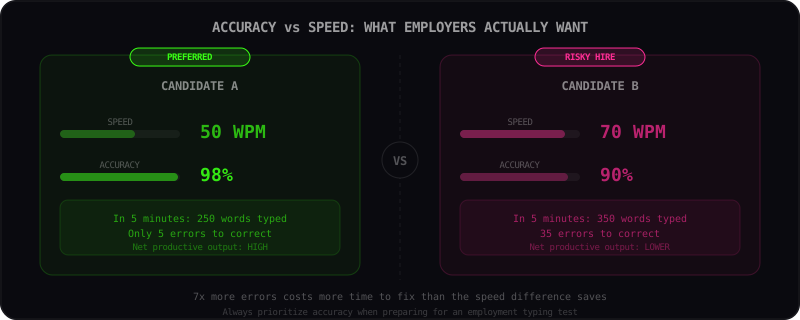
THE MATH
At 70 WPM with 90% accuracy, you produce 35 errors in a 5-minute test. Each error takes time to find and fix. At 50 WPM with 98% accuracy, you only produce 5 errors. The slower typist actually has higher net productivity.
WHAT THIS MEANS FOR YOU
When practicing, slow down until you can type with 95%+ accuracy consistently. Then gradually increase speed while maintaining that accuracy. This approach will produce the best test scores and real-world job performance.
HOW TO PREPARE FOR YOUR TEST
A proven preparation strategy that works in 2-3 weeks
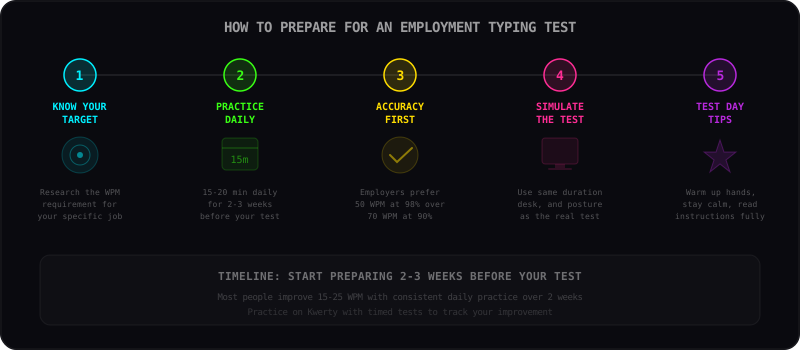
PRACTICE DAILY
Consistency beats intensity. Spending 15-20 minutes per day practicing on Kwerty will build muscle memory faster than occasional marathon sessions. Track your WPM over time to see improvement.
FOCUS ON ACCURACY FIRST
Employers weigh accuracy heavily. An applicant typing 50 WPM at 98% accuracy will often be preferred over one typing 70 WPM at 90% accuracy. Train yourself to slow down and get it right, then gradually increase speed.
SIMULATE TEST CONDITIONS
Practice with a timer set to the same duration your employer will use. Sit at a desk with proper posture. Remove distractions. The more realistic your practice environment, the more confident you will feel on test day.
Don't know touch typing yet? Learning proper finger placement before your employment test can dramatically improve both speed and accuracy. It's the single biggest upgrade you can make.
WHAT EMPLOYERS LOOK FOR
Speed alone is not enough to pass an employment typing test
Speed (WPM)
Your raw words per minute score is the first metric employers evaluate. Each role has a minimum threshold, and exceeding it makes you a stronger candidate.
Accuracy Percentage
High speed means nothing with frequent errors. Most employers require 95% accuracy or higher. Some roles like transcription and dispatch demand 97-99% accuracy.
Consistency Over Time
Employers want typists who maintain their speed throughout a full work day, not just in a 30-second burst. Longer test durations reveal your sustainable typing speed.
Endurance Under Pressure
Job typing tests are stressful. Practice under timed conditions with Kwerty to build composure. Your test-day performance should match your practice performance.
TEST DAY TIPS
What to do on the day of your employment typing test
Warm Up Your Hands
Do 5 minutes of practice typing before the actual test. Cold, stiff fingers type slower and make more mistakes.
Read All Instructions
Don't rush into the test. Read every instruction carefully. Some tests have specific rules about corrections, formatting, or timing.
Maintain Steady Pace
Don't sprint at the start and slow down. A consistent, steady speed produces better results than bursts followed by fatigue.
Don't Panic Over Errors
If you make a mistake, correct it calmly and move on. Panicking after an error causes a cascade of more errors. Stay focused.
Use Proper Posture
Sit upright with feet flat, wrists floating, and elbows at 90 degrees. Good posture directly improves speed and reduces tension.
Breathe and Stay Calm
Anxiety tenses your muscles and slows you down. Take a deep breath before starting. Remember: you've practiced for this.
2-WEEK PRACTICE SCHEDULE
Follow this plan to maximize your WPM before test day
Baseline & Foundation
Take 3 practice tests on Kwerty to establish your baseline WPM and accuracy. If you're below 30 WPM, start with touch typing basics. Focus entirely on using correct finger placement — speed doesn't matter yet.
Build Consistency
Practice 15-20 minutes daily. Focus on maintaining 95%+ accuracy at whatever speed feels comfortable. Don't rush. Your WPM will naturally increase as your fingers learn the key positions.
Increase Speed
Start pushing speed slightly above your comfort zone. Take timed tests at the same duration your employer will use. If accuracy drops below 93%, slow back down. Aim for 5-10 WPM above your baseline.
Simulate & Polish
Full test simulations daily. Sit at a proper desk, use a timer, and remove all distractions. Practice staying calm and maintaining a steady pace. You should be hitting your target WPM consistently by now.
Start your practice now on Kwerty's typing arena. Want to make practice more fun? Try typing games with Rush and Survival modes, or read our tips to type faster.
EMPLOYMENT TYPING TEST FAQ
Common questions about typing tests for jobs
What typing speed do I need for a data entry job?
Most data entry positions require a typing speed between 50 and 80 WPM with at least 95% accuracy. Entry-level data entry roles may accept speeds as low as 40 WPM, while senior or specialized positions often require 70 WPM or higher. Practice consistently on Kwerty to reach your target speed.
How do employers test typing speed?
Employers typically use timed typing assessments during the hiring process. These tests measure words per minute (WPM) and accuracy over a set period, usually 1 to 5 minutes. Some employers use standardized testing platforms, while others administer their own in-house tests. The format is similar to what you will find on Kwerty.
What is a good typing speed for employment?
A good typing speed for general employment is 50-60 WPM with 95%+ accuracy. For data entry roles, aim for 60-80 WPM. Administrative assistants should target 45-60 WPM. Transcriptionists need 70-90 WPM. Any speed above 50 WPM with high accuracy makes you competitive for most office positions.
Can I practice for a job typing test for free?
Yes. Kwerty is a completely free typing test tool — no sign-up, no paywall. You can take unlimited timed typing tests with instant WPM and accuracy results. Practice with different durations to match your employer's test format and build both speed and accuracy.
How long is a pre-employment typing test?
Most pre-employment typing tests last between 1 and 5 minutes. The most common duration is 3 minutes. Some employers use 1-minute tests for quick screening, while others use 5-minute tests to measure sustained typing speed and endurance under realistic conditions.
Is 40 WPM good enough for an office job?
40 WPM is the minimum threshold for most general office positions. While you can get hired at 40 WPM, aiming for 50-60 WPM will make you more competitive and efficient in your role. Administrative and secretarial positions often prefer candidates who type at 50 WPM or faster.
What happens if I fail an employment typing test?
If you fail an employment typing test, some employers allow a retake after a waiting period (usually 1-2 weeks). Others may disqualify you for that specific position. The best strategy is to practice extensively before the test so you can pass confidently on the first attempt.
Do typing test results expire?
Typing test results from practice platforms like Kwerty do not expire, but employers may require you to take their specific test during the hiring process. Having recent practice results shows your current ability level and helps you prepare for the actual assessment.
Should I use touch typing for an employment test?
Absolutely. Touch typing (using all 10 fingers without looking at the keyboard) is the fastest and most accurate typing method. If you don't already touch type, learning it before your employment test will significantly improve your scores. See our free touch typing guide to get started.
What accuracy percentage do employers require?
Most employers require a minimum of 92-95% accuracy. Data entry and admin roles typically need 95%+. Medical transcription and emergency dispatch roles demand 97-99% accuracy because errors in these fields have serious consequences. Always prioritize accuracy over raw speed.
RELATED RESOURCES
Free Typing Speed Test
Measure your current WPM and accuracy with our free timed typing test. No sign-up required.
Learn Touch Typing
Complete free guide to touch typing with finger placement diagrams and step-by-step instructions.
Average Typing Speed
See how your speed compares to averages by age and profession. Understand where you stand.
How to Type Faster
Advanced techniques and tips to boost your WPM for employment assessments.
Typing Practice Tips
Effective practice strategies that improve accuracy and speed faster.
Coding Typing Test
Applying for a developer role? Practice typing code syntax and special characters.
WOULD YOU PASS?
Type the phrase below and see if you meet the job requirements
Click here and type the words to check your speed
NAIL YOUR EMPLOYMENT TYPING TEST
Start practicing now and walk into your job interview with confidence. Free, unlimited practice tests with instant WPM and accuracy feedback — no sign-up needed.