KEYCHRON K2 REVIEW
A research-based review built from published specs and long-term owner feedback. Here's what's actually good, what's not, and whether it's worth $80 in 2026.
By Soexya Khatiwada · Updated 2026-08-03
Rating
4.5 / 5
Direct price
$49.99
Amazon: ~$75-95
Best for
All-rounder
Save $25 this week — Keychron direct is cheaper
Amazon Associate + Keychron Affiliate. We earn a small commission on qualifying purchases.
Interactive picker
FIND YOUR PERFECT K2 SETUP
Three quick questions — we'll recommend the right switch type.
1. How much do you type daily?
2. Where will you use it?
3. Mac or PC?
Pick an answer above to start.
Quick verdict
Why the K2 keeps winning recommendations.
On paper the K2 is a solid mid-tier mechanical. What makes it stand out in years of owner feedback is how few compromises it asks for — hot-swap sockets so you can change switch type without a new board, real Mac/PC support that just works, and a wireless battery owners routinely report lasting a week of heavy typing. Three recurring gripes (covered below), but if you only read this verdict: it's one of the most universally-useful mechanicals under $100.
CHECK CURRENT PRICE ON AMAZON →Try a quick typing test first
Knowing your current speed helps you measure the upgrade later
Click here and type the words to check your speed
WHAT'S GOOD AND WHAT'S NOT
✓ PROS
- +75% layout keeps hands centered — function keys without the wasted numpad
- +Hot-swappable switches: try Brown, Red, or Blue without soldering
- +Real Mac + PC switch — first-class support for both, not an afterthought
- +Wireless and wired both work cleanly; no perceptible latency on USB
- +Battery life is genuinely all-week (4-5 days of heavy typing per charge)
- +Build quality punches above the price — aluminum frame option feels premium
✕ CONS
- −Stock keycaps are ABS plastic — they shine over time. Worth swapping eventually.
- −Tall profile means a wrist rest is almost mandatory for long sessions
- −Bluetooth occasionally drops on wake-from-sleep on Mac (1-2s reconnect)
- −RGB on the version-1 model is meh; v2 is much better but ~$10 more
- −No dedicated arrow indent — touch-typists may miss the inverted-T spacing
HOW IT FEELS IN DAILY USE
What long-term owners consistently report
The first thing you notice is the layout. Coming from a full-size keyboard, the 75% format feels cramped for about a day — then your hands adapt, and you realize how much wasted space the numpad was eating. Your right hand moves to the mouse roughly an inch closer. Over a full day, that adds up.
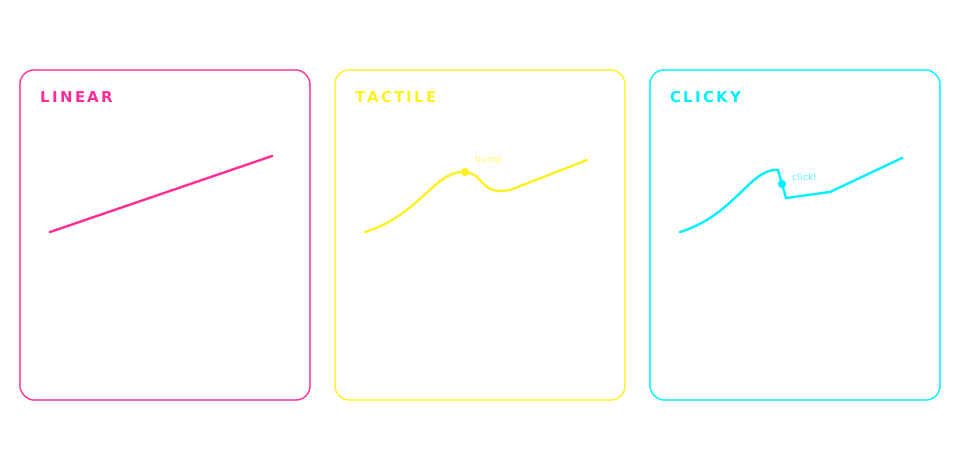
Switch feel matters more than people admit. The most popular pick is Gateron Brown — a light tactile bump with no click. A keyboard can't make you faster directly; what a consistent tactile bump does is give uniform feedback per keystroke, so your fingers stop over-pressing and accuracy climbs first, with speed following. That mechanism is the recurring theme in owner reports of typing-speed gains after switching from mushy laptop or membrane boards.
Build quality is the surprise. The aluminum-frame version (a $10 upcharge) feels heavier and more solid than keyboards twice the price. There's no flex, no ping, no creaks. You know it'll outlast 2-3 budget boards.
Wireless mode is reliable. The biggest worry switching from wired is latency — and for typing (unlike competitive gaming), Bluetooth latency on the K2 is below what typists report being able to feel. The one recurring complaint in owner reviews: after Mac sleep, Bluetooth occasionally takes 1-2 seconds to reconnect on first keypress.
The keycaps are the weakest link. Stock ABS plastic shines after 4-5 months of heavy use — common across most keyboards in this price range. A $25 PBT keycap set fixes this completely and feels much better, but you shouldn't have to budget for that day one.
HOW IT COMPARES TO OTHERS
The K2 vs other keyboards we recommend on kwerty
Keyboard
Price
Layout
Hot-swap
Wireless
Best for
Keychron K2
Price: ~$80
Layout: 75%
Hot-swap: Yes
Wireless: Yes
Best for: All-rounder pick
Logitech MX Keys
Price: ~$110
Layout: Full / TKL
Hot-swap: No (membrane)
Wireless: Yes
Best for: Comfort, multi-device
Royal Kludge RK84
Price: ~$65
Layout: 75%
Hot-swap: Yes
Wireless: Yes
Best for: Budget alternative
Redragon K552
Price: ~$30
Layout: TKL
Hot-swap: No
Wireless: No
Best for: First mechanical
See more comparisons: full keyboard guide (six picks, $30-$200) or our wireless-only comparison (four picks, budget to premium).
WHO IT'S FOR
✓ Buy this if you...
- • Type 2+ hours a day and want to feel the upgrade
- • Use both Mac and PC and want one keyboard for both
- • Want to try mechanical without committing to one switch type forever
- • Care about a clean wireless desk but also want wired reliability
- • Plan to keep this keyboard for 5+ years
✕ Skip this if you...
- • Type rarely (under 1 hour/day) — a $30 board is fine
- • Need a full-size board with a dedicated numpad
- • Want low-profile / scissor-switch comfort (get the MX Keys)
- • Are on a strict $50 budget — the RK84 gives you 90% for less
- • Hate the slight learning curve of a 75% layout
READY TO UPGRADE?
Check current prices on Amazon or buy direct from Keychron. Keychron often runs sales that beat Amazon — currently starting at $49.99 direct.
Amazon Associate + Keychron Affiliate. We earn a small commission on qualifying purchases.
Not a Prime member? Amazon's 30-day free Prime trial covers fast, free shipping on any pick here, and you can cancel before it renews. US store only; we earn a referral bounty if you start a trial through that link.
KEYCHRON K2 FAQ
Answers to the questions buyers ask most
Is the Keychron K2 good for typing speed?
Yes — it's one of the most-recommended mechanical keyboards for typists specifically. The 75% layout keeps your hands closer to the home row than a full-size board, the hot-swappable sockets let you experiment with switch types to find what works best for your fingers, and the consistent tactile feedback (especially with Brown switches) helps build muscle memory faster than membrane keyboards. Many typists report their accuracy improving within the first few weeks of switching from a membrane board.
Which switches should I get for the Keychron K2?
For typing speed, Brown switches (Gateron Brown or equivalent) are the safe default — light tactile bump confirms the keypress, no loud click. If you already prefer linear feel and want max speed at the cost of less feedback, go with Red switches. Blue switches are clicky and great for learning touch typing, but the noise can be fatiguing during long sessions. Since the K2 is hot-swappable, you can change later without buying a new keyboard.
Is the Keychron K2 worth $80?
For anyone who types 2+ hours a day, yes. You're paying for build quality, hot-swap sockets, wireless + wired support, and Mac/PC compatibility — features that usually cost $120+ together. If you only type casually, a Redragon K552 at $30 will give you 80% of the typing experience. The K2's value is in being a long-term board you won't outgrow as you get faster.
Keychron K2 vs Logitech MX Keys — which is better for typing?
Different goals. The K2 is mechanical with consistent feedback that helps build typing speed and muscle memory. The MX Keys is membrane with concave keycaps designed for comfort during 8-hour typing days — best in class for not fatiguing your fingers. If your priority is speed improvement, get the K2. If you type all day for work and just want something that doesn't hurt, get the MX Keys. Many serious typists own both for different sessions.
Does the K2 work with Mac?
Yes, and properly — not as an afterthought. There's a hardware switch on the side to toggle between Mac and Windows mode, which remaps Cmd/Option/Ctrl correctly. Mac-specific keycaps are included in the box. Bluetooth pairing with macOS is standard, though there's a known minor issue where it can take 1-2 seconds to reconnect after sleep.
How long does the battery last?
Realistic battery life is 4-5 days of heavy typing (8+ hours/day) with backlight on, or about a week with backlight off. Charging is via USB-C and goes from empty to full in about 3 hours. You can use the keyboard while it charges, so it never blocks your work.
Is the Keychron K2 loud?
Depends on the switch. With Brown or Red switches, it's about as loud as a typical office membrane keyboard — maybe slightly louder on bottom-out. With Blue switches, it's noticeably louder due to the click mechanism (avoid Blues if you're in a shared office or on video calls often). The case itself dampens sound well, especially the aluminum frame version.