Updated 2026-09-15

Best Quiet Keyboards in 2026

Six genuinely quiet keyboards for offices, shared spaces, and late-night typing. Silent mechanical switches, gasket-mounted construction, low-profile design, and premium membrane options compared.

By Soexya Khatiwada ยท Updated 2026-09-15

Contains affiliate links โ€” as an Amazon Associate, Kwerty earns from qualifying purchases at no cost to you. Full disclosure

Short answer

For most quiet-typing users, the keyboard to buy is the Logitech MX Keys โ€” the quietest pick on this list โ€” near-whisper scissor-switch membrane keys, plus multi-device pairing for laptop + desktop workflows.

Key facts

  • โ€บThe quietest keyboard on this list is the Logitech MX Keys (~$110): scissor-switch membrane keys with under 2 mm of travel, quieter than any mechanical switch.
  • โ€บThe quietest mechanical pick is the Logitech G915 TKL (~$160), with low-profile GL switches at 50 g actuation and 2.7 mm travel.
  • โ€บSilent Red and Silent Brown switches use internal rubber dampeners; they are quieter than standard Red/Brown switches but still louder than a membrane keyboard.
  • โ€บGasket-mounted boards (Aula F75, IQUNIX OG80) suspend the switch plate on rubber pads to cut bottom-out clack; the Aula F75 does this for about $40.
  • โ€บBlue clicky switches are the loudest common switch type, and no 'silent blue' switch exists because the click mechanism cannot be dampened.
  • โ€บA mechanical switch has three sound sources โ€” the stem hitting the bottom housing, the stem hitting the top housing on the return, and the plate ringing โ€” and a membrane key has one, the cap slapping the case. Every quiet pick below is quiet by suppressing a specific subset of those.
  • โ€บLow-profile and low-travel are different things: low-profile means a shorter switch housing (Nuphy Air75 V2, G915 TKL), low-travel means a shorter keypress (MX Keys, under 2 mm). Both cut bottom-out energy, but only scissor-switch low-travel boards get below silent-mechanical volume.
Live ยท Now

Today's Amazon Picks โ†’

Prices and stock update continuously on Amazon. Tap any product below to jump straight to today's live Amazon page.

SEE ALL PICKSโ†’
Verified Amazon links In-stock checked Prime-eligible picks

As an Amazon Associate we earn from qualifying purchases.

Buying criteria

What makes a keyboard good for quiet-typing users

Genuinely quiet โ€” not just marketed as quiet

Many keyboards are marketed as 'quiet' but are still about as loud as a normal conversation when you type at speed. Genuinely quiet keyboards run closer to whisper volume โ€” quiet enough for a shared office or late-night use without disturbing others.

Switch type matters more than marketing

For mechanical keyboards, Silent Red and Silent Brown switches use rubber dampeners to muffle sound. Standard Red and Brown switches are noticeably louder. For membrane keyboards, scissor-switch (like Logitech MX Keys) is quieter than dome-switch (typical office keyboards).

Gasket-mounted absorbs impact

Gasket-mounted keyboards suspend the switch plate on rubber pads, absorbing impact when keys bottom out. This significantly reduces the 'clack' sound of typing. Aula F75, IQUNIX OG80, and Keychron K2 Pro all use gasket mounting.

Low-profile keys travel less distance

Low-profile keyboards (Nuphy Air75, Logitech G915 TKL) have shorter key travel โ€” 3mm vs 4mm on standard mechanical. Less travel means less impact when bottoming out, and less noise per keystroke. This is why laptop keyboards are naturally quieter than standard mechanical.

Size guide

Which layout size fits your desk?

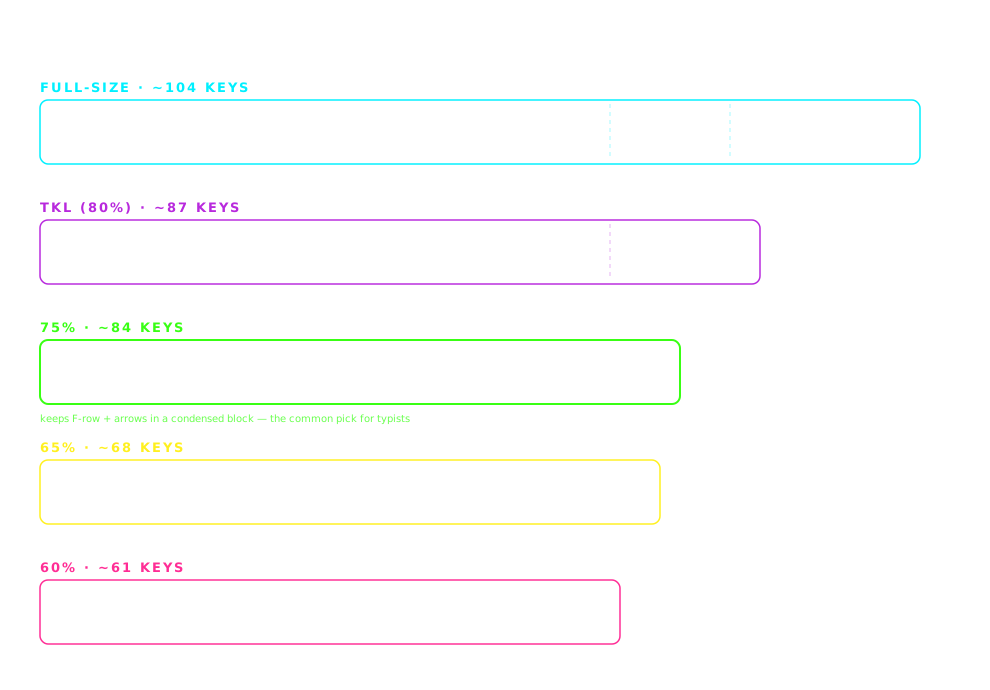
Keyboard form factors compared to scale: full-size (~44 cm, ~104 keys), TKL (~36 cm, ~87 keys), 75% (~32 cm, ~84 keys), 65% (~31 cm, ~68 keys) and 60% (~29 cm, ~61 keys)
Widths drawn to scale. The layout column in the comparison table below uses these size names.

The picks

The 6 best keyboards for quiet-typing users

#1

Logitech MX Keys

~$110QUIETEST OVERALL

The quietest keyboard on this list, and one of the quietest productivity keyboards ever made. Scissor-switch membrane keys are inherently quieter than any mechanical option. Multi-device pairing for laptop + desktop + iPad workflows.

Pros

  • +Whisper-quiet โ€” measurably quieter than any mechanical
  • +Multi-device pairing (3 devices, toggle instantly)
  • +USB-C rechargeable (5 months per charge)
  • +Auto-adjust ambient light backlight
  • +Full-size but with a compact bezel

Cons

  • โˆ’Not mechanical โ€” no tactile bump
  • โˆ’Membrane feel isn't for switch enthusiasts

Best for: Shared offices, night-shift workers, video-conference-heavy roles
#2

Logitech G915 TKL

~$160QUIETEST MECHANICAL

The quietest mechanical keyboard on this list. Low-profile GL switches โ€” mechanical in feel and durability but with the shorter travel of laptop keys. TKL layout. Wireless with Lightspeed protocol (< 1ms latency).

Pros

  • +Low-profile GL switches โ€” quiet mechanical
  • +Wireless Lightspeed (< 1ms latency) + Bluetooth
  • +TKL layout with function row and arrows
  • +Premium aluminum build

Cons

  • โˆ’Expensive for a TKL
  • โˆ’Not hot-swappable

Best for: Office workers who want mechanical feel but need it to be genuinely quiet

#3

Keychron K2 (Silent switches)

~$85BEST VALUE QUIET MECHANICAL

Order the Keychron K2 with Silent Red or Silent Brown switches. Rubber dampeners inside the switch reduce click and bottom-out sound. Hot-swap sockets let you upgrade to even quieter switches later.

Pros

  • +Silent Red / Silent Brown switch options
  • +Wireless (Bluetooth) + wired USB-C
  • +Mac and Windows keycaps included
  • +Hot-swap for switching to quieter switches later

Cons

  • โˆ’Still louder than membrane keyboards
  • โˆ’Silent switches lose some tactile bump vs standard

Best for: Office workers wanting mechanical typing under $100 with dampened noise

#4

Nuphy Air75 V2

~$110BEST LOW-PROFILE MECHANICAL

Low-profile mechanical for quiet typing. Shorter key travel means less impact when bottoming out, and less noise per keystroke. Gateron low-profile switches are quieter than full-height mechanical switches by design.

Pros

  • +Low-profile โ€” shorter travel = quieter typing
  • +Wireless (Bluetooth + 2.4GHz) with 4000mAh battery
  • +Aluminum frame, premium build
  • +Compact 75% layout

Cons

  • โˆ’Non-standard low-profile keycaps limit customization
  • โˆ’Louder than membrane but quieter than most full-profile mechanical

Best for: Home offices where you want mechanical feel with quieter sound signature

#5

Aula F75

~$40QUIETEST BUDGET MECHANICAL

The budget quiet mechanical answer. Gasket-mounted construction absorbs impact, pre-lubed linear switches feel smooth and quiet. Quieter than most $80 mechanical boards at half the price.

Pros

  • +Gasket-mounted โ€” quieter than standard mechanical builds
  • +Pre-lubed linear switches feel smooth from day one
  • +Hot-swap sockets for future customization
  • +75% layout with arrows retained

Cons

  • โˆ’Wired only (no wireless)
  • โˆ’Aula brand less established than Keychron / Logitech

Best for: Budget-conscious buyers wanting quiet mechanical typing under $50

#6

IQUNIX OG80

~$200PREMIUM QUIET MECHANICAL

Gasket-mounted premium mechanical. Deep, thocky sound that's dampened by the gasket mount. Aluminum body absorbs vibration. Not the absolute quietest option, but the best premium option that stays quiet.

Pros

  • +Gasket-mounted โ€” dampened premium feel
  • +Deep thocky sound signature (muted, not loud)
  • +Aluminum body, retro-inspired design
  • +Cherry MX Silent Red option available

Cons

  • โˆ’Wired only
  • โˆ’Premium price for a productivity tool

Best for: Enthusiasts who want a premium keyboard that stays office-appropriate

Not a Prime member? Amazon's 30-day free Prime trial covers fast, free shipping on any pick here, and you can cancel before it renews. US store only; we earn a referral bounty if you start a trial through that link.

Compare

Side-by-side comparison

KeyboardPriceWirelessHot-swap
Logitech MX Keys~$110YesNo
Logitech G915 TKL~$160YesNo
Keychron K2 (Silent switches)~$85YesYes
Nuphy Air75 V2~$110YesYes
Aula F75~$40NoYes
IQUNIX OG80~$200NoYes

Switch guide

Linear vs tactile vs clicky โ€” 10-second version

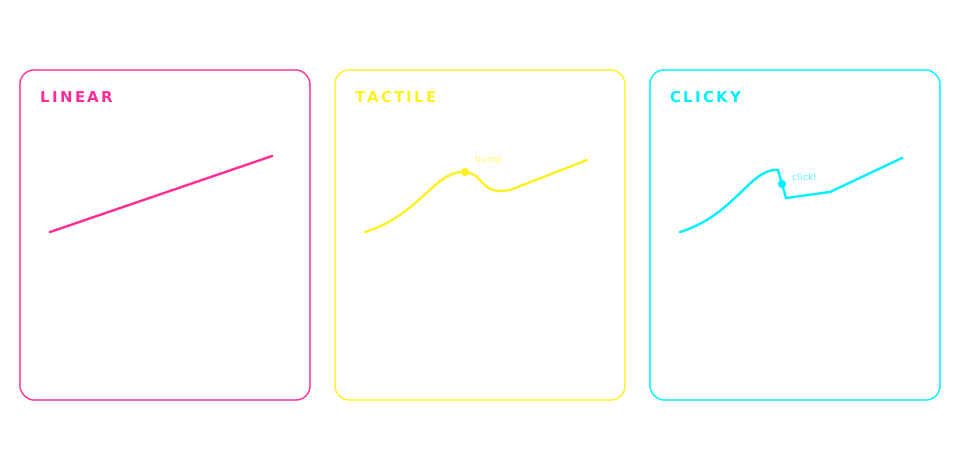
Mechanical switch types compared: linear switches feel smooth and are the quietest, tactile switches add a feelable bump and are the most popular for typing, clicky switches add an audible click and are the loudest
Generalized by switch family โ€” individual switches vary. When a pick above lists Brown switches, that's the tactile column.

Quiet for whom

THE RIGHT QUIET KEYBOARD FOR YOUR ROOM

โ€œQuietโ€ is measured by whoever has to hear it: a microphone, the next desk, a library, a video call. The ranking above is by volume; this is by situation.

Creators with a microphone on the desk

Pick: Logitech MX Keys, or the G915 TKL if you need mechanical

The noise floor is your mic, not the room. A condenser mic six inches from the keys picks up the return clack of a mechanical switch even when the room can't hear it, and it lands in the recording on every keystroke. Scissor-switch membrane has no return clack at all. If you must have a switch, the G915's low-profile GL Linear has the smallest return sound of any mechanical pick here, and a noise gate set just above room tone catches the rest.

Skip: Tactile and clicky switches of any kind; the bump itself is a transient your mic will keep.

Library, study hall, shared workspace

Pick: Logitech MX Keys; Aula F75 if the budget is $40

Here the test is the person one seat over. The MX Keys stays under conversation volume at full speed. The Aula F75's gasket mount and pre-lubed linears make it the quietest mechanical board at its price, but it is still audible in a silent room, so it is the pick when quiet-enough beats silent.

Skip: Anything full-height with standard Red or Brown switches, however 'quiet' the listing says.

Mac users

Pick: MX Keys for Mac; Keychron K2 with Silent switches or Nuphy Air75 V2 for mechanical

Two things matter beyond sound: Mac legends on the caps, and a Command key where your thumb expects it. The Mac version of the MX Keys has both. The K2 and the Air75 V2 ship with Mac keycaps in the box and a hardware Mac/Win toggle. Note the wired trap: the MX Keys' USB port only charges, so it cannot be used as a cabled keyboard on a locked-down work Mac.

Skip: The G915 TKL and other Windows-legend boards unless you are comfortable remapping modifiers in System Settings.

Open-plan and video-call offices

Pick: Logitech MX Keys or Logitech G915 TKL

Laptop microphones sit inches from the keys, which is why every meeting platform ships keyboard-noise suppression. The suppression works on clacks, not on the low thud of bottom-out, and it is the thud that a membrane board removes and a low-profile board halves. Both picks also pair to three devices, which matters more in an office than anywhere else.

Skip: Gasket-mounted full-height boards: quieter than standard, still a thud on every key.

Students on a budget

Pick: Aula F75 at ~$40; Keychron K2 Silent at ~$85 if it will be the keyboard for four years

The F75 is the whole quiet-mechanical argument for the price of a textbook: gasket mount, lubed linears, hot-swap sockets so the switches can be changed to silents later. The K2 Silent costs twice as much and is quieter out of the box, with a build that survives a degree.

Skip: Any board that lists Blue switches, and any 'gaming' board with speed switches; both are the loudest option in the room.

Low-profile or low-travel, and which one you actually want

Pick: Low-travel for silence (MX Keys); low-profile for mechanical feel at lower volume (Air75 V2, G915 TKL)

They are not the same. Low-profile is a shorter switch housing, so the board sits lower and travel drops to about 2.5-3 mm. Low-travel is a shorter keypress whatever the housing; the MX Keys' scissor keys travel under 2 mm and have no stem to clack. If the goal is the quietest board, low-travel scissor wins. If the goal is a mechanical feel that is merely quieter, low-profile is the compromise.

Skip: Low-profile clicky switches; the shorter housing does nothing for a click.

Where each pick removes the noise

THREE SOUND SOURCES, SIX ANSWERS

A mechanical key makes noise in three places: the stem hitting the floor, the stem hitting the top housing on the way back up, and the plate ringing with both. A membrane key makes it in one. Each pick here is quiet because it removes a particular subset; the cutaway shows exactly where.

PickBottom-out thudReturn clackPlate ringHow
Logitech MX Keysโœ“โœ“โœ“scissor membrane: no stem, no plate
Logitech G915 TKLโœ“โœ“โ€”low-profile GL: short travel, small return
Keychron K2 (Silent)โœ“โœ“โ€”rubber dampeners on both ends of the stem
Nuphy Air75 V2โœ“โ€”โ€”low-profile travel; standard return
Aula F75โœ“โ€”โœ“gasket mount + lubed linears
IQUNIX OG80โœ“โ€”โœ“gasket mount; choose Silent Red for the return

Read across: the only board that removes all three is the one with no switch at all, which is why the membrane pick sits at the top of a mechanical list.

Frequently asked

Common questions

What is the quietest keyboard you can buy?+
The quietest productivity keyboard in this lineup is the Logitech MX Keys โ€” scissor-switch membrane keys that stay near whisper volume even at fast typing speeds. Among mechanical keyboards, the Logitech G915 TKL with GL Tactile or Linear switches is the quietest pick here. Cherry MX Silent Red switches on any gasket-mounted board come in third-quietest.
Are silent mechanical switches actually quiet?+
Yes, silent mechanical switches (Cherry MX Silent Red, Silent Brown, and equivalents from Gateron and Kailh) use rubber dampeners inside the switch housing to muffle the click and bottom-out sound, making them noticeably quieter than standard switches of the same type. However, they are still louder than any membrane keyboard โ€” 'silent mechanical' is quieter than standard mechanical, but not silent in the absolute sense.
Which switch is quietest โ€” Red, Brown, or Blue?+
Red switches (linear, no bump) are quietest among the standard three. Brown switches (tactile bump) are moderately louder due to the bump. Blue switches (clicky) are the loudest because they have both a bump and an audible click mechanism. For quiet typing, choose Silent Red or Silent Brown if available. Silent Blue does not exist because the click mechanism cannot be effectively dampened.
Is a membrane keyboard quieter than a mechanical keyboard?+
Yes, membrane keyboards are inherently quieter than mechanical keyboards. Membrane switches use a rubber dome that compresses silently when pressed, while mechanical switches have moving plastic parts that make more noise. However, cheap membrane keyboards can be loud due to plastic case rattle. Premium membrane keyboards like the Logitech MX Keys are the quietest productivity keyboards available.
Does a gasket-mounted keyboard type quieter?+
Yes, gasket-mounted keyboards are quieter than tray-mounted or plate-mounted keyboards. The gasket suspends the switch plate on rubber pads, which absorb the impact when keys bottom out. This significantly reduces the 'clack' sound that comes from plate vibration. Gasket-mounted boards like the Aula F75, Keychron K2 Pro, and IQUNIX OG80 all benefit from this quieter typing experience.
How quiet is quiet enough for a shared office?+
For a shared office, aim for a keyboard no louder than a conversation held from across the room โ€” audible if someone listens for it, but not disruptive during focused work. Scissor-switch membrane boards and silent/dampened mechanical switches meet this bar; the Logitech MX Keys, Logitech G915 TKL, and Keychron K2 with Silent switches are the picks on this list that qualify. Clicky blue-switch mechanical keyboards are the loudest common switch type and are inappropriate for shared offices.
Which quiet keyboard is best for a Mac?+
The Logitech MX Keys in its Mac version is the quietest Mac option โ€” scissor-switch membrane keys with Mac legends and macOS media keys, though it cannot be used wired because its USB port only charges. For a quiet mechanical Mac board, the Keychron K2 with Silent switches ships with both Mac and Windows keycaps and a hardware Mac/Win toggle, and the Nuphy Air75 V2 is the low-profile alternative with the same toggle. Avoid Windows-only boards like the G915 TKL unless you are happy remapping Command and Option.
What is the difference between low-profile and low-travel keyboards?+
Low-profile means the switch housing itself is shorter, so the whole board sits lower; the Nuphy Air75 V2 and Logitech G915 TKL are low-profile mechanical boards with about 2.5-3 mm of travel. Low-travel means the keypress is short regardless of housing; the Logitech MX Keys is a low-travel scissor-switch board with under 2 mm. Both reduce bottom-out energy and therefore noise, but scissor-switch low-travel boards are quieter than any low-profile mechanical switch because there is no stem or housing to clack.

Disclosure

As an Amazon Associate we earn from qualifying purchases, and a fixed referral bounty if you start a Prime trial through our link. Picks on this page are research-based: chosen from published specs, long-term owner feedback, and what the mechanical keyboard community consistently recommends for quiet-typing users โ€” we have not hands-on tested every board listed. Prices update in real time on Amazon and may differ from any examples shown. Last updated 2026-09-15.