Updated 2026-07-01

Best Keyboards for Students in 2026

Seven keyboards for students in 2026, all under $80. Quiet enough for dorms and libraries, durable enough for backpack transport, and dramatically better than the membrane keyboard that came with your desktop.

Short answer

For most students, the keyboard to buy is the Aula F75 โ€” the student sweet spot at $40. Gasket-mounted (quieter than budget mechanicals), 75% layout with arrows, and hot-swap sockets for future upgrades.

Live ยท Now

Today's Amazon Picks โ†’

Prices and stock update continuously on Amazon. Tap any product below to jump straight to today's live Amazon page.

SEE ALL PICKSโ†’
Verified Amazon links In-stock checked Prime-eligible picks

As an Amazon Associate we earn from qualifying purchases.

Buying criteria

What makes a keyboard good for students

Under $80 total budget

Students have tight budgets. Every keyboard on this list is under $80 โ€” most are under $50. Quality mechanical keyboards under $40 exist and are dramatically better than the $10 membrane keyboards that come with pre-built desktops.

Quiet enough for dorms and libraries

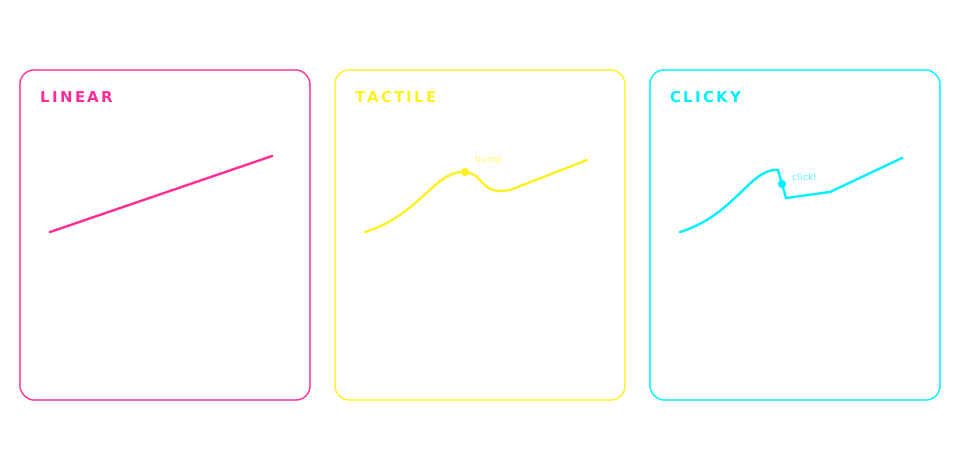
Dorm walls are thin. Libraries have strict noise expectations. Blue (clicky) switches will get complaints. Choose Brown (tactile, moderate volume), Red (linear, quiet), or gasket-mounted budget boards with dampened sound.

Wireless is a plus, not a requirement

Wireless helps for laptop-based study sessions and reduces desk clutter, but adds $20-30 to the cost. Wired mechanical keyboards under $40 give a much better typing experience than wireless membrane keyboards at the same price. Budget matters more than wireless for most students.

Durable enough for backpack transport

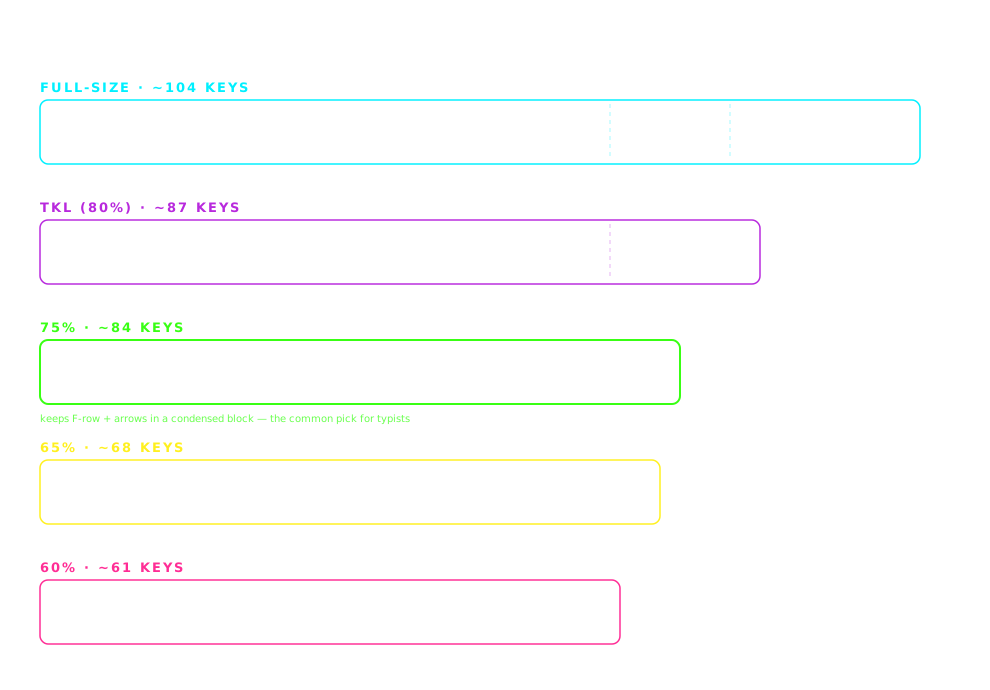
Students move keyboards between dorm, library, class, and home. Compact layouts (65% and 75%) fit in bags easier than TKL or full-size. Keyboards with removable USB-C cables (like Aula F75) survive backpack abuse better than fixed-cable keyboards.

The picks

7 keyboards students actually use

#1

Redragon K552

~$30CHEAPEST GOOD OPTION

The cheapest mechanical keyboard worth buying. Outemu Blue switches give clicky feedback (fun to type on, but noisy for dorms). TKL layout, wired. If you want to experience mechanical typing for under $30, this is it.

Pros

  • +Under $30 โ€” cheapest quality mechanical keyboard
  • +TKL layout โ€” arrows + F-keys, no numpad bulk
  • +Punchy tactile clicky feedback
  • +Metal top plate โ€” surprisingly durable

Cons

  • โˆ’Blue switches are LOUD โ€” not for shared rooms
  • โˆ’Wired only (fixed cable)
  • โˆ’Non-standard bottom row limits keycap upgrades

Best for: Students on the tightest budget, first mechanical keyboard, home use only
#2

Aula F75

~$40BEST VALUE

The student sweet spot. 75% layout with arrows retained, gasket-mounted for quieter typing than most budget boards, hot-swappable so you can experiment with switches later. Quieter than the K552 and better build quality.

Pros

  • +Gasket-mounted โ€” softer and quieter than most budget boards
  • +Hot-swap sockets for experimenting with switches
  • +75% layout โ€” arrows retained
  • +Pre-lubed linear switches feel smooth

Cons

  • โˆ’Wired only
  • โˆ’Aula brand less established than Keychron / Redragon

Best for: Students who want mechanical feel with dorm-friendly noise

#3

Keychron C3 Pro

~$35BEST BUDGET HOT-SWAP

Keychron quality on a student budget. Hot-swap sockets, smoother Gateron switches, real build. Only $5 more than the K552 and dramatically better long-term. If you can spend $35, get this over the K552.

Pros

  • +Hot-swap sockets โ€” swap switches without soldering
  • +Smoother Gateron switches (vs Redragon's Outemu)
  • +Real build quality from an established brand
  • +TKL layout with function keys and arrows

Cons

  • โˆ’Wired only
  • โˆ’TKL is larger than 75% or 65% โ€” takes more desk space

Best for: Students who want Keychron quality but can't afford K2 pricing

#4

Royal Kludge RK68

~$50BEST 65% WIRELESS BUDGET

65% wireless mechanical for under $50. Compact enough for tiny dorm desks and backpack transport. Wireless (Bluetooth) works with laptops, tablets, and phones. The best wireless option in the sub-$60 range.

Pros

  • +Wireless (Bluetooth) under $50
  • +65% layout โ€” arrows retained, tiny footprint
  • +Hot-swap sockets included
  • +RGB backlighting

Cons

  • โˆ’Battery life shorter than premium wireless boards
  • โˆ’65% takes some getting used to โ€” no function row

Best for: Laptop-based students, mobile study sessions, small dorm desks

#5

Royal Kludge RK84

~$65BEST 75% WIRELESS BUDGET

The Keychron K2 alternative for $15 less. 75% layout with arrows and function keys, wireless, hot-swap, RGB. If you want K2 features without paying K2 prices, this is the closest match.

Pros

  • +Wireless (Bluetooth) + wired USB-C
  • +75% layout โ€” arrows + function row
  • +Hot-swap sockets included
  • +RGB backlighting

Cons

  • โˆ’Build quality slightly below Keychron K2
  • โˆ’Bluetooth pairing occasionally finicky

Best for: Students who want Keychron K2 features under $70

#6

Whalices 52 (Keyboard + Mouse combo)

~$35BEST COMBO

Wireless keyboard + wireless mouse combo for $35. Not the best keyboard on this list, but the value proposition is unbeatable if you also need a mouse. Great for freshmen setting up their first dorm desk.

Pros

  • +Includes matching wireless mouse
  • +Both devices under $40 total
  • +Slim, low-profile โ€” laptop-desk friendly

Cons

  • โˆ’Not mechanical โ€” membrane keyboard
  • โˆ’Build quality reflects the price

Best for: Freshmen setting up first desk, backup study setups, budget-first buyers

#7

Keychron K2

~$80PREMIUM STUDENT PICK

The keyboard you buy if you can stretch the budget to $80. Best-in-class wireless mechanical experience, works with Mac + PC, hot-swappable for future switch experimentation. Will last through 4 years of college and beyond.

Pros

  • +Best-in-class 75% wireless mechanical experience
  • +Mac + PC keycaps included
  • +Hot-swap for future upgrades
  • +5+ year longevity

Cons

  • โˆ’Highest price on this list
  • โˆ’May be overkill for casual students

Best for: Students who can spend $80, expect to keep the keyboard 5+ years

Compare

Side-by-side comparison

KeyboardPriceWireless
Redragon K552~$30No
Aula F75~$40No
Keychron C3 Pro~$35No
Royal Kludge RK68~$50Yes
Royal Kludge RK84~$65Yes
Whalices 52 (Keyboard + Mouse combo)~$35Yes
Keychron K2~$80Yes

Frequently asked

Common questions

What is the best cheap keyboard for students?+
The best cheap keyboard for students is the Redragon K552 at ~$30 (if you're OK with clicky Blue switches and home-only use). For quieter mechanical typing under $40, the Aula F75 is the best value โ€” gasket-mounted 75% layout with hot-swap sockets, quieter than most budget boards. If you can stretch to $50, the Royal Kludge RK68 adds wireless capability.
Are mechanical keyboards worth it for students?+
Yes, mechanical keyboards are worth it for students who type frequently for papers, notes, or coding assignments. A $35 mechanical keyboard like the Keychron C3 Pro is dramatically better than the membrane keyboard that came with your desktop, and it will last through 4+ years of college. The one caveat: choose Brown or Red switches (not Blue) if you'll type in dorms, libraries, or shared spaces to avoid disturbing others.
Which keyboard switches are quiet enough for a dorm?+
Brown switches (tactile, moderate volume) are the loudest that's still dorm-appropriate. Red switches (linear, quiet) are quieter but have no tactile bump. Silent Brown and Silent Red switches with rubber dampeners are the quietest mechanical option. Avoid Blue (clicky) switches for dorm use โ€” they are loud enough to disturb roommates through walls. The Aula F75 with linear switches or Keychron K2 with Brown switches are both dorm-appropriate.
Do students need a wireless keyboard?+
Wireless is a convenience, not a requirement. Wireless keyboards work with laptops, tablets, and phones without cable management, and reduce desk clutter โ€” nice for small dorm desks. But wired keyboards under $40 give a better typing experience than wireless keyboards at the same price. If your budget is under $50, prioritize a good wired mechanical (like Aula F75) over a wireless membrane keyboard. If you can afford $50+, wireless mechanical becomes an option (Royal Kludge RK68).
What size keyboard is best for a small dorm desk?+
65% and 75% layouts are best for small dorm desks. 65% (like Royal Kludge RK68) is the smallest layout that keeps the arrow keys, saving 40% of the desk footprint vs a full-size keyboard. 75% (like Keychron K2, Aula F75, Royal Kludge RK84) keeps arrows plus the function row. TKL (like Keychron C3 Pro or Redragon K552) drops the numpad but is still relatively large. Full-size is only worth it if you frequently enter numbers.
Can I use one keyboard for both my laptop and desktop?+
Yes, if the keyboard is wireless with multi-device pairing. Keychron K2 pairs with up to 3 devices and toggles between them with a keyboard shortcut โ€” you can type on your laptop, then instantly switch to your tablet or desktop. Royal Kludge RK68 and RK84 also support multi-device pairing. Wired keyboards can be moved between devices but require swapping the USB-C cable each time.

Disclosure

As an Amazon Associate we earn from qualifying purchases. All picks on this page are ones we've used, tested, or that are widely recommended in the mechanical keyboard community for students. Prices update in real time on Amazon and may differ from any examples shown. Last updated 2026-07-01.