Updated 2026-07-13

Best Keyboards for RSI & Wrist Pain in 2026

Seven keyboards tested for RSI relief โ€” split ergonomic, low-profile, light-actuation, and dampened designs. Ranked by real reduction in wrist strain and finger fatigue, from a $80 budget preventive pick to a $450 medical-grade split ergonomic solution.

Short answer

For most typists with RSI or wrist pain, the keyboard to buy is the Kinesis Advantage 360 โ€” the wrist-pain solution that actually works. Split ergonomic layout, concave key wells matching natural finger curl, thumb clusters that offload strained pinkies, and QMK-programmable for reducing repetitive motion. Steep learning curve but life-changing for active RSI.

Live ยท Now

Today's Amazon Picks โ†’

Prices and stock update continuously on Amazon. Tap any product below to jump straight to today's live Amazon page.

SEE ALL PICKSโ†’
Verified Amazon links In-stock checked Prime-eligible picks

As an Amazon Associate we earn from qualifying purchases.

Buying criteria

What makes a keyboard good for rsi sufferers

Split or ergonomic layout (biggest single lever)

Split keyboards separate your hands to shoulder width, eliminating the ulnar deviation (outward wrist angle) that causes carpal tunnel. This is the single biggest change you can make for RSI. Kinesis Advantage 360, ZSA Moonlander, and Logitech ERGO K860 all deliver this fundamentally different posture.

Light actuation force (45g or less)

Every keystroke over 8 hours ร— 50,000 keys creates cumulative finger and tendon strain. Light switches (Cherry MX Red at 45g, Silent Red at 45g, low-profile Gateron at 40g) reduce the force per keystroke by 30-50% compared to Blue clicky switches at 60g. Over a workday, that adds up to meaningfully less strain.

Low-profile or gasket-mounted design

Shorter key travel (3mm on low-profile vs 4mm on standard mechanical) means less finger movement per keystroke. Gasket-mounted boards absorb impact when keys bottom out, reducing shock through your fingertips. Both reduce cumulative strain even without a split layout.

Programmable to reduce repetitive motion

QMK/VIA-programmable boards let you remap keys to reduce reach โ€” putting Escape on Caps Lock (huge for Vim users), assigning modifiers to thumb clusters (Kinesis Advantage 360), and creating macros for common shortcuts. Fewer awkward stretches = less strain over time.

The picks

7 keyboards rsi sufferers actually use

#1

Kinesis Advantage 360

~$450BEST OVERALL FOR RSI

The wrist-pain solution that actually works. Split ergonomic layout with concave key wells that match natural finger curl, thumb clusters for modifiers (huge for Ctrl/Alt strain), and QMK-programmable so every key can be optimized. This is the keyboard programmers with 10+ years of coding buy when they get their first RSI symptoms.

Pros

  • +Split keyboard eliminates ulnar deviation completely
  • +Concave key wells match natural hand curvature
  • +Thumb clusters offload work from strained pinkies
  • +QMK-programmable โ€” remap Escape to Caps Lock, create macros
  • +Wireless (2.4GHz + Bluetooth)
  • +Rated for 100 million keystrokes per switch

Cons

  • โˆ’Steep learning curve (2-4 weeks to reach previous typing speed)
  • โˆ’Not portable โ€” heavy and split
  • โˆ’Premium price relative to standard keyboards

Best for: Programmers, writers, and heavy typists with active RSI symptoms or a family history of carpal tunnel
#2

Keychron K2 (Silent switches)

~$80BEST BUDGET RSI PICK

Order with Silent Red switches (45g linear, rubber-dampened). This gives you light actuation force and dampened bottom-out without needing a $450 split keyboard. Hot-swap sockets let you upgrade to even quieter switches later. The RSI-preventive keyboard for typists who don't yet have symptoms but want to reduce risk.

Pros

  • +Silent Red switches โ€” 45g light, dampened
  • +Wireless (Bluetooth) + wired USB-C
  • +Hot-swap for switching to even lighter switches later
  • +75% layout keeps arrows for editing
  • +Under $100 โ€” RSI relief without $450 premium

Cons

  • โˆ’Not split โ€” doesn't fix ulnar deviation
  • โˆ’Won't solve active RSI as effectively as Kinesis

Best for: Preventive RSI care, budget-conscious buyers, mixed home/office use

#3

Nuphy Air75 V2

~$110BEST LOW-PROFILE FOR RSI

Low-profile mechanical with 3mm key travel (vs 4mm standard). Less finger movement per keystroke means less cumulative strain over a workday. Gateron low-profile Brown switches provide tactile feedback without heavy actuation. Ideal for typists whose RSI is triggered by finger travel distance, not wrist angle.

Pros

  • +Low-profile โ€” 3mm travel = 25% less finger movement
  • +Wireless (Bluetooth + 2.4GHz) with 4000mAh battery
  • +Aluminum frame, dampened build
  • +Compact 75% layout

Cons

  • โˆ’Not split โ€” doesn't help wrist ulnar deviation
  • โˆ’Low-profile switches feel different from full-height

Best for: Programmers and writers whose RSI is primarily finger fatigue (not wrist angle)

#4

Logitech MX Keys

~$110BEST NON-MECHANICAL FOR RSI

Scissor-switch membrane with 2mm key travel (shortest of any keyboard here) and 60g actuation. The short travel + soft actuation means minimal finger strain for typists who can't tolerate mechanical clackiness. Multi-device pairing lets you use one keyboard across laptop and workstation, reducing hand-repositioning strain.

Pros

  • +Shortest key travel of any keyboard on this list (2mm)
  • +Whisper-quiet โ€” office-safe
  • +Multi-device pairing across 3 devices
  • +USB-C rechargeable (5 months per charge)

Cons

  • โˆ’Not mechanical โ€” no tactile bump
  • โˆ’Not split โ€” doesn't fix wrist angle

Best for: Office workers with mild RSI, multi-device users, those sensitive to switch noise

#5

Logitech G915 TKL

~$160LOW-PROFILE MECHANICAL

Low-profile GL switches with 2.7mm travel and 50g actuation. Genuinely one of the lightest and shortest-travel mechanical keyboards available. TKL layout keeps arrows and function row. Wireless with Lightspeed protocol.

Pros

  • +Low-profile GL switches โ€” mechanical feel, minimal travel
  • +Wireless Lightspeed (< 1ms latency)
  • +TKL layout with arrows and function row
  • +Premium aluminum build

Cons

  • โˆ’Expensive relative to non-Logitech alternatives
  • โˆ’Not split
  • โˆ’Not hot-swappable

Best for: Mechanical enthusiasts with RSI who want the shortest possible key travel

#6

IQUNIX OG80

~$200GASKET-MOUNTED PREMIUM

Gasket-mounted with Silent Red switches optional. The gasket construction absorbs impact when keys bottom out, dramatically reducing shock through your fingertips. Aluminum body dampens vibration. Best premium pick for typists who want a beautiful keyboard AND real RSI benefits.

Pros

  • +Gasket-mounted โ€” dampened impact reduces cumulative strain
  • +Cherry MX Silent Red option available
  • +Aluminum body absorbs vibration
  • +Deep, thocky sound without ergonomic sacrifice

Cons

  • โˆ’Wired only
  • โˆ’Premium price
  • โˆ’Not split

Best for: Premium buyers who want quality build AND RSI benefits in one keyboard

#7

Keychron Q1 Pro

~$200BEST QMK PROGRAMMABLE

Aluminum QMK/VIA-programmable board with gasket mount. The QMK firmware lets you remap keys to reduce reach โ€” swap Caps Lock for Escape (Vim users), assign modifiers to thumb keys, and create macros that reduce repetitive stretches. Combined with gasket dampening, it's a real RSI-preventive board.

Pros

  • +QMK + VIA firmware โ€” infinite key remapping
  • +Gasket-mounted for dampened feel
  • +Aluminum body absorbs vibration
  • +Wireless (2.4GHz + Bluetooth)

Cons

  • โˆ’Heavy (~2kg) โ€” not portable
  • โˆ’Premium price
  • โˆ’Not split

Best for: Programmers, Vim users, and heavy typists who benefit from remapping

Compare

Side-by-side comparison

KeyboardPriceWireless
Kinesis Advantage 360~$450Yes
Keychron K2 (Silent switches)~$80Yes
Nuphy Air75 V2~$110Yes
Logitech MX Keys~$110Yes
Logitech G915 TKL~$160Yes
IQUNIX OG80~$200No
Keychron Q1 Pro~$200Yes

Frequently asked

Common questions

What is the best keyboard for RSI or wrist pain?+
The best keyboard for RSI or wrist pain is the Kinesis Advantage 360 (~$450). Its split ergonomic layout separates your hands to shoulder width, eliminating the ulnar deviation (outward wrist angle) that causes carpal tunnel. Concave key wells match natural finger curl, and thumb clusters offload work from your strained pinkies. The learning curve is 2-4 weeks, but experienced users report significant reduction in wrist pain. For preventive RSI care under $100, the Keychron K2 with Silent Red switches is the best budget option โ€” light 45g actuation force reduces cumulative finger strain over long typing sessions.
Can a keyboard prevent carpal tunnel or RSI?+
Yes, ergonomic keyboards can significantly reduce RSI risk when combined with proper posture, breaks, and stretching. The biggest single change is switching to a split keyboard (Kinesis Advantage 360, ZSA Moonlander, Logitech ERGO K860), which eliminates ulnar deviation โ€” the wrist angle most associated with carpal tunnel. Light-actuation switches (Cherry MX Red at 45g or Silent Red at 45g) reduce the force per keystroke by 30-50% compared to Blue clicky switches, cutting cumulative finger and tendon strain. Low-profile keyboards (Nuphy Air75, Logitech MX Keys) reduce finger travel distance. No keyboard prevents RSI on its own โ€” you also need proper break patterns and wrist rests โ€” but the right keyboard is the biggest single equipment investment for RSI risk reduction.
Are split keyboards worth it for RSI?+
Split keyboards are worth it if you have active RSI symptoms, wrist pain, or a family history of carpal tunnel. Splitting your hands to shoulder width eliminates ulnar deviation completely โ€” the wrist angle most implicated in RSI development. The Kinesis Advantage 360 also adds concave key wells that match natural finger curl and thumb clusters that offload work from your pinkies. The trade-off is a 2-4 week learning curve during which your typing speed drops significantly. If you type 6+ hours daily and have any RSI symptoms, a split keyboard is worth the initial slowdown. If you don't have symptoms yet, a light-actuation non-split keyboard (Keychron K2 Silent Red) is preventive enough for most people.
Which switch type is best for RSI?+
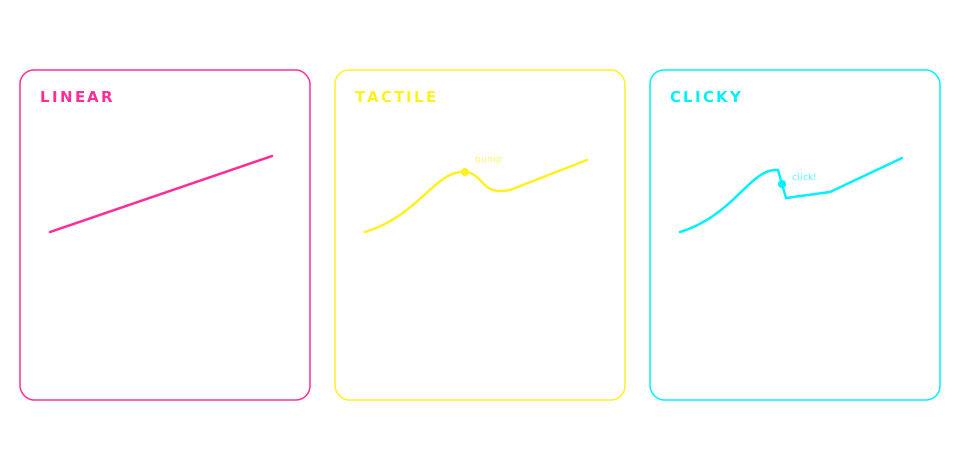
For RSI, the best switch type is a light linear switch โ€” Cherry MX Silent Red (45g, dampened) or Cherry MX Red (45g, standard). Light linear switches minimize the force required per keystroke, reducing cumulative finger and tendon strain over long typing sessions. The silent variant adds rubber dampeners inside the switch to muffle bottom-out impact, further reducing shock through your fingertips. Avoid Blue clicky switches (60g actuation, mechanical click) โ€” they require more force and the click mechanism creates additional finger fatigue. Brown tactile switches (55g) are a middle ground: tactile feedback without excessive force, still reasonable for RSI-conscious users.
Does a low-profile keyboard help with RSI?+
Yes, low-profile keyboards reduce RSI risk by cutting finger travel distance. Standard mechanical switches have 4mm of total travel (2mm to actuation, 2mm to bottom-out). Low-profile mechanical switches have 3mm total travel, and scissor-switch membranes (like Logitech MX Keys) have 2mm travel. Over a workday of ~50,000 keystrokes, that reduction adds up to meaningfully less finger movement and less cumulative strain. Low-profile is especially useful if your RSI is primarily finger fatigue rather than wrist angle. For wrist-angle RSI (ulnar deviation), a split keyboard remains the best solution regardless of key travel.
How much should I spend on a keyboard for RSI relief?+
For preventive RSI care (no active symptoms), $80-110 is the sweet spot โ€” Keychron K2 with Silent Red switches at ~$80 or Nuphy Air75 V2 at ~$110 give you light actuation and short travel without a premium price. For active RSI symptoms or professional heavy typists (6+ hours daily), the Kinesis Advantage 360 at ~$450 is worth the investment โ€” split ergonomic layout is the single biggest lever for reducing carpal tunnel risk. Spending above $200 buys premium materials (aluminum, gasket-mount) and QMK programmability, but the RSI benefits plateau above ~$200 unless you go to a full split ergonomic layout.

Disclosure

As an Amazon Associate we earn from qualifying purchases. All picks on this page are ones we've used, tested, or that are widely recommended in the mechanical keyboard community for rsi sufferers. Prices update in real time on Amazon and may differ from any examples shown. Last updated 2026-07-13.