Updated 2026-07-01

Best Keyboards for Programmers in 2026

Seven mechanical keyboards developers actually use in 2026, tested across coding-specific criteria: switch tactility, layout efficiency, QMK/VIA programmability, and ergonomics for 8-hour sessions.

Short answer

For most programmers, the keyboard to buy is the Keychron K2 โ€” wireless, 75% layout, hot-swappable, and priced right at ~$80. It's the default answer that most programmers won't outgrow for years.

Live ยท Now

Today's Amazon Picks โ†’

Prices and stock update continuously on Amazon. Tap any product below to jump straight to today's live Amazon page.

SEE ALL PICKSโ†’
Verified Amazon links In-stock checked Prime-eligible picks

As an Amazon Associate we earn from qualifying purchases.

Buying criteria

What makes a keyboard good for programmers

Tactile feedback over speed

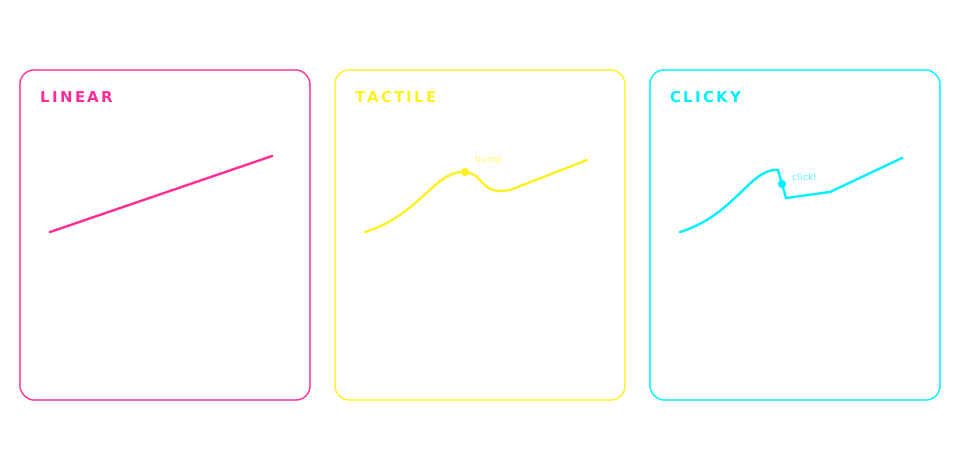
Programmers type in bursts โ€” a line of code, a pause to think, another burst. Tactile switches (Brown, Cherry MX Brown, Gateron Brown) give a satisfying bump on each keypress without the fatigue of clicky switches.

Layout that fits your workflow

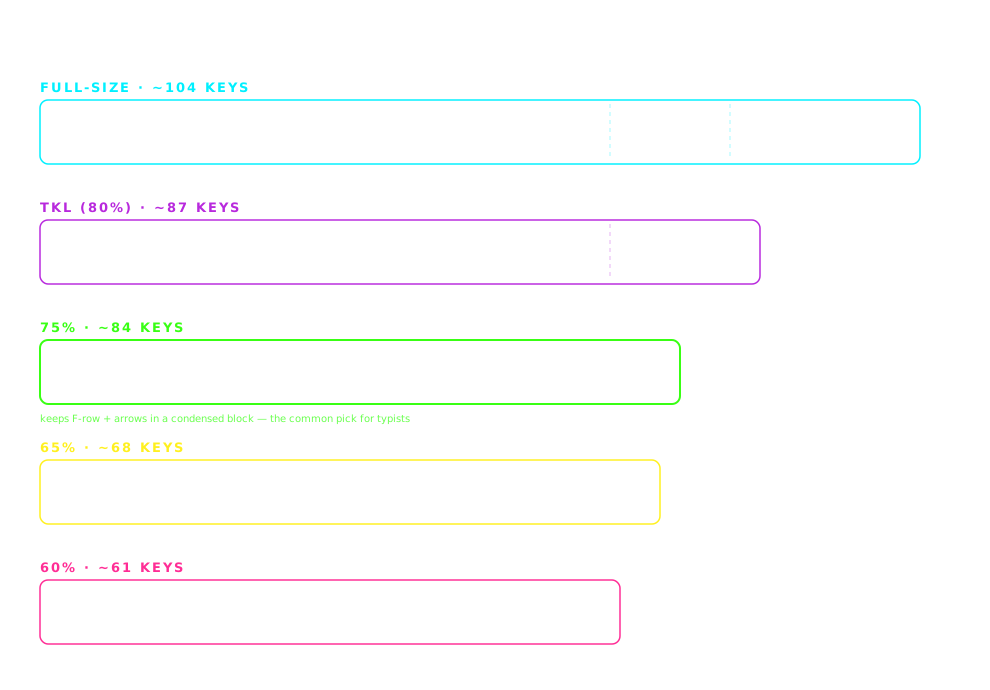
60% and 65% layouts save desk space and reduce mouse-reach for shortcuts. TKL keeps the arrows and navigation cluster. Full-size only if you're constantly using the numpad.

Programmable keys (QMK / VIA)

Advanced programmers benefit from remapping keys, adding layers, and creating macros. Keychron Q-series, Drop CTRL, and Kinesis all support QMK firmware for total customization.

Split or ergonomic if you have wrist pain

10+ years of typing takes a toll. Split keyboards (Kinesis Advantage 360, ZSA Moonlander) separate your hands to shoulder width, dramatically reducing wrist strain and RSI risk.

The picks

7 keyboards programmers actually use

#1

Keychron K2

~$80MOST POPULAR

The default answer for programmers new to mechanical keyboards. 75% layout keeps arrows and function keys, wireless works with Mac and PC, hot-swappable so you can experiment with switches later.

Pros

  • +Wireless (Bluetooth 5.1) + wired USB-C
  • +Mac and Windows keycaps included
  • +Hot-swap sockets for switch experimentation
  • +75% layout โ€” compact but keeps arrows

Cons

  • โˆ’Not QMK-programmable (uses Keychron software)
  • โˆ’Battery life shorter than higher-end wireless boards

Best for: First mechanical keyboard, Mac+PC dual users, most programmers under $100
#2

Keychron Q1 Pro

~$200BEST QMK / VIA

Full aluminum body, gasket-mounted, wireless, and fully QMK/VIA programmable. Every key can be remapped, macros programmed, layers configured. This is the flagship for coders who want total control.

Pros

  • +QMK + VIA firmware โ€” infinite customization
  • +Aluminum CNC body, deep thocky sound
  • +Gasket-mounted for softer typing feel
  • +Wireless (2.4GHz + Bluetooth) with USB-C wired

Cons

  • โˆ’Heavy (~2kg) โ€” not portable
  • โˆ’Premium price for premium build

Best for: Advanced programmers, VIM users, keyboard remap enthusiasts

#3

Drop CTRL High-Profile

~$200PREMIUM TKL

The thinking programmer's TKL. Deep tactile sound, hot-swappable, and one of the most well-built keyboards under $250. Drop's QMK firmware lets you configure every key.

Pros

  • +High-profile aluminum case with deep sound
  • +Hot-swappable + QMK-programmable
  • +USB-C passthrough on the top
  • +TKL โ€” arrows + navigation without numpad bulk

Cons

  • โˆ’Wired only (no Bluetooth)
  • โˆ’Louder than office-friendly keyboards

Best for: Programmers who want a TKL layout with premium feel

#4

Kinesis Advantage 360

~$450BEST FOR RSI

The wrist-pain solution. Split ergonomic layout separates your hands to shoulder width, contoured key wells match natural hand curvature, and QMK firmware lets you remap everything. Life-changing for programmers with RSI.

Pros

  • +Split keyboard reduces wrist ulnar deviation dramatically
  • +Concave key wells match natural finger curl
  • +Thumb clusters for modifiers (Ctrl, Alt, Cmd)
  • +QMK firmware โ€” full programmability

Cons

  • โˆ’Steep learning curve (2-4 weeks to acclimate)
  • โˆ’Expensive relative to standard keyboards

Best for: Programmers with wrist pain, RSI, or carpal tunnel history

#5

Nuphy Air75 V2

~$110BEST LOW-PROFILE

Low-profile mechanical done right. Slim like a laptop keyboard but with real tactile switches. Perfect for programmers who need to travel or want a low-profile mechanical for their desk.

Pros

  • +Low-profile โ€” closer feel to laptop keyboards
  • +Wireless (Bluetooth + 2.4GHz) with 4000mAh battery
  • +Compact 75% layout
  • +Premium aluminum-frame build

Cons

  • โˆ’Low-profile switches feel different from full-height Cherry MX
  • โˆ’Non-standard keycaps limit customization

Best for: Traveling programmers, laptop-augmenters, minimalist desk setups

#6

Keychron K6

~$85BEST 65%

K2 quality in a 65% layout. Arrows retained, function row removed. Ideal for programmers who use terminal + tiling window managers or who want maximum desk space for mouse.

Pros

  • +65% layout โ€” keeps arrows, drops F-row
  • +Wireless + hot-swap
  • +Same Keychron quality as K2 in smaller footprint

Cons

  • โˆ’No dedicated function row (Fn+number instead)
  • โˆ’Not QMK-programmable

Best for: Terminal-heavy programmers, tmux/vim users, small-desk setups

#7

Logitech MX Keys

~$110BEST NON-MECHANICAL

Not mechanical, but the most comfortable membrane keyboard for programmers who type all day and can't tolerate switch noise in shared offices. Multi-device pairing lets you toggle between laptop, workstation, and iPad instantly.

Pros

  • +Whisper-quiet โ€” office-safe
  • +Pairs with 3 devices, toggle via keys
  • +Backlit with auto-adjust ambient sensor
  • +Rechargeable (USB-C, 5 months per charge)

Cons

  • โˆ’Not mechanical โ€” no tactile bump
  • โˆ’Membrane feel isn't for switch enthusiasts

Best for: Office-based programmers, silent-typing requirements, multi-device workflows

Compare

Side-by-side comparison

KeyboardPriceWireless
Keychron K2~$80Yes
Keychron Q1 Pro~$200Yes
Drop CTRL High-Profile~$200No
Kinesis Advantage 360~$450Yes
Nuphy Air75 V2~$110Yes
Keychron K6~$85Yes
Logitech MX Keys~$110Yes

Frequently asked

Common questions

Do programmers need a mechanical keyboard?+
Programmers don't strictly need a mechanical keyboard, but most professional developers prefer one for two reasons: (1) tactile feedback confirms each keypress without needing to bottom-out, which reduces finger fatigue over 8-hour coding sessions, and (2) mechanical switches are rated for 50-100 million keypresses vs 5-10 million for membrane keyboards, so they last 5-10 years of heavy use. For coding-specific tasks like heavy VIM navigation or IDE shortcuts, mechanical keyboards feel noticeably better.
What layout is best for programming โ€” 60%, 65%, TKL, or full-size?+
For most programmers, 65% is the sweet spot: it keeps the arrow keys and a small navigation cluster while removing the function row and numpad. TKL (tenkeyless, ~80% layout) works well if you use the function keys often. 60% is preferred by terminal-heavy programmers who never leave their keyboard. Full-size is only needed if you enter numeric data constantly. Kinesis Advantage 360 uses a split ergonomic layout that's different from all of the above but reduces wrist strain the most.
Which switches are best for programming โ€” Brown, Blue, or Red?+
Brown (tactile, quiet) is the safest default for programming โ€” you feel a bump on each keypress without a loud click. Blue (clicky) is louder and better for typists who want maximum feedback, but distracting to coworkers. Red (linear, quiet) has no bump and is preferred by gamers and speed typists. Most programmers pick Brown or Silent Brown for the best balance of feedback and office-friendliness.
Are split keyboards worth it for programmers?+
Split keyboards are worth it if you have wrist pain, RSI, or type 8+ hours a day. The Kinesis Advantage 360 and ZSA Moonlander separate your hands to shoulder width and eliminate ulnar deviation (the wrist angle that causes carpal tunnel). The learning curve is 2-4 weeks โ€” you'll be slower during that period โ€” but experienced users report significant reduction in wrist strain. If you don't have wrist issues yet, a split keyboard is preventive rather than essential.
Should I get a QMK/VIA programmable keyboard?+
QMK/VIA lets you remap any key, create layers, and program macros without software running on your OS. This is valuable if you use custom keyboard shortcuts, want a caps-lock-to-escape remap for VIM, or need macros for repetitive coding tasks. For most programmers, VIA (a GUI for QMK) is sufficient. Keychron Q-series, Drop CTRL, and Kinesis Advantage 360 all support VIA. If you don't remap keys, QMK is not necessary.
Is a wireless keyboard OK for coding?+
Yes, modern wireless mechanical keyboards (Keychron K2/K6/Q1 Pro, Nuphy Air75) have less than 5ms latency via 2.4GHz dongle โ€” imperceptible for typing. Bluetooth adds ~10-20ms which is fine for coding but slightly worse for competitive gaming. Battery life ranges from 40 hours (RGB on) to 4+ months (RGB off, low use). Wired is only necessary for gamers or programmers who dislike charging cycles.

Disclosure

As an Amazon Associate we earn from qualifying purchases. All picks on this page are ones we've used, tested, or that are widely recommended in the mechanical keyboard community for programmers. Prices update in real time on Amazon and may differ from any examples shown. Last updated 2026-07-01.