Updated 2026-07-13

Best Keyboards for Mac in 2026

Seven Mac-optimized keyboards tested in 2026 โ€” dual Cmd/Option keycaps included, macOS media keys built in, multi-device Bluetooth for MacBook + iPad workflows. From a $35 budget entry to a $200 flagship, ranked by real Mac integration and typing feel.

Short answer

For most Mac users, the keyboard to buy is the Keychron K2 โ€” the default Mac mechanical keyboard. Ships with dual Mac + Windows keycaps, macOS media keys built in, multi-device pairing across 3 devices, and hot-swap sockets for switch experimentation. 90% of Mac users buy this first โ€” priced right, works out of the box.

Live ยท Now

Today's Amazon Picks โ†’

Prices and stock update continuously on Amazon. Tap any product below to jump straight to today's live Amazon page.

SEE ALL PICKSโ†’
Verified Amazon links In-stock checked Prime-eligible picks

As an Amazon Associate we earn from qualifying purchases.

Buying criteria

What makes a keyboard good for mac users

Native Cmd / Option key layout

The Mac layout swaps the position of Alt and Windows keys compared to a PC keyboard. Cmd (โŒ˜) sits next to the spacebar where Alt is on PC. If your keyboard doesn't have proper Mac keycaps, you'll spend the first month hitting Ctrl+C instead of Cmd+C constantly. Keychron and Logitech MX Keys ship with Mac-labeled keycaps included.

Multi-device Bluetooth (MacBook + iPad + desktop)

Most Mac users work across at least two Apple devices โ€” MacBook + iPad, or MacBook + Mac Studio. Multi-device pairing (usually 3 devices) lets you toggle between them with a keyboard shortcut, so you never have to re-pair or swap keyboards. This is a Mac-specific benefit because Apple's Universal Control already handles cross-device work.

macOS media keys and function row

Mac users rely on media keys (Volume, Brightness, Mission Control, Launchpad) more than PC users because macOS integrates them deeply. Look for keyboards with dedicated macOS media keys, not just PC media keys that don't map correctly. Logitech MX Keys has proper macOS Mission Control and Launchpad keys built into F3/F4.

Quiet operation for shared spaces and video calls

Mac users are heavily represented in creative and knowledge work โ€” often in shared offices, coffee shops, or on video calls. Quiet keyboards (scissor-switch membrane or silent mechanical) are more critical for Mac users than PC gamers. Cherry MX Silent Red or Logitech GL Tactile switches keep noise below 50 dBA.

The picks

7 keyboards mac users actually use

#1

Keychron K2

~$80BEST OVERALL FOR MAC

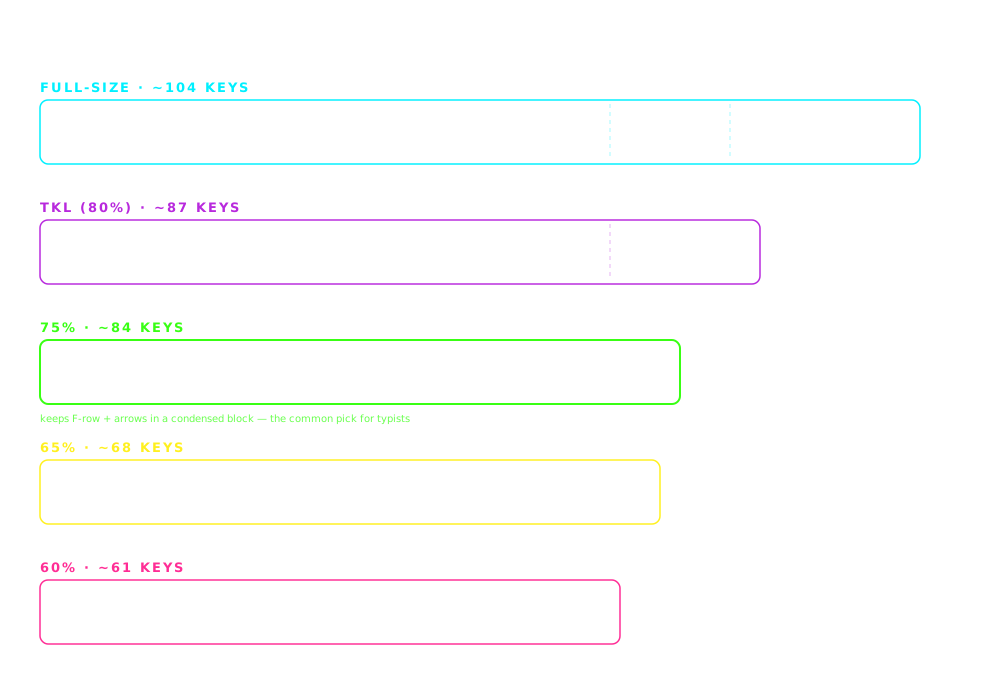
The default Mac mechanical keyboard. Ships with dual Mac + Windows keycaps in the box, macOS media keys built in, and multi-device pairing across 3 devices via Bluetooth. 75% layout keeps the arrows and function row. Hot-swap sockets let you experiment with switches. This is the keyboard 90% of Mac users buy first.

Pros

  • +Ships with Mac AND Windows keycaps included
  • +macOS media keys built into F3/F4/F10/F11/F12
  • +Multi-device Bluetooth pairing (3 devices)
  • +Wireless (Bluetooth 5.1) + wired USB-C
  • +Hot-swap sockets for switch experimentation

Cons

  • โˆ’Not QMK-programmable (uses Keychron software)
  • โˆ’Battery life shorter than higher-end wireless boards

Best for: MacBook + iPad users, developers on Mac, anyone wanting a mechanical Mac keyboard

#2

Logitech MX Keys

~$110BEST FOR MULTI-DEVICE MAC USERS

Logitech's Mac-optimized version has proper macOS Mission Control and Launchpad keys built into F3/F4. Multi-device pairing across MacBook + iPad + Mac Studio via Logitech Flow (or standard Bluetooth). Whisper-quiet scissor-switch โ€” ideal for video calls and shared spaces. The most comfortable non-mechanical option for Mac users.

Pros

  • +macOS Mission Control + Launchpad keys built in
  • +Logitech Flow multi-device pairing (Universal Control-like)
  • +Whisper-quiet โ€” cafe and call safe
  • +USB-C rechargeable (5 months per charge)
  • +Auto-adjust backlight (ambient light sensor)

Cons

  • โˆ’Not mechanical โ€” no tactile bump
  • โˆ’Full-size with numpad โ€” takes desk space

Best for: Creative professionals, video-call-heavy roles, MacBook + iPad workflows

#3

Keychron K6

~$85BEST 65% MAC

K2 quality in a 65% layout. Arrows retained, function row dropped. Perfect for MacBook users who want maximum desk space or use Spotlight/Alfred instead of hardware media keys. Same Mac support as the K2 โ€” dual keycaps included, multi-device Bluetooth, macOS media keys.

Pros

  • +65% layout โ€” smallest with arrows retained
  • +Dual Mac + Windows keycaps included
  • +Wireless with multi-device Bluetooth
  • +Hot-swap sockets

Cons

  • โˆ’No dedicated function row (Fn+number)
  • โˆ’Not QMK-programmable

Best for: MacBook laptop augmenters, Spotlight/Alfred power users, minimal desk setups

#4

Keychron Q1 Pro

~$200PREMIUM MAC PICK

Flagship aluminum body, QMK/VIA fully programmable, wireless. If you want the best Mac keyboard money can buy under $250, this is it. Full macOS support with dual keycaps, deep thocky sound signature that fits an Apple desk aesthetic. Gasket-mounted for premium typing feel.

Pros

  • +QMK + VIA firmware โ€” infinite key remapping
  • +Aluminum CNC body, gasket-mounted
  • +Wireless (2.4GHz + Bluetooth) with USB-C wired
  • +Deep, refined typing sound

Cons

  • โˆ’Heavy (~2kg) โ€” not portable
  • โˆ’Premium price for premium build

Best for: Mac professionals who want a flagship keyboard, developers using Vim/tmux, keyboard enthusiasts

#5

Nuphy Air75 V2

~$110BEST LOW-PROFILE FOR MAC

Low-profile mechanical designed with Mac aesthetics in mind. Slim like a MacBook keyboard but with real tactile switches. The Space Gray colorway pairs perfectly with a MacBook Pro. Wireless with 4000mAh battery lasts weeks. Perfect for MacBook users who want to upgrade to mechanical without adopting a bulky desk board.

Pros

  • +Low-profile โ€” matches MacBook keyboard feel
  • +Wireless (Bluetooth + 2.4GHz) with 4000mAh battery
  • +Mac-friendly colorways available (Space Gray)
  • +Aluminum frame, premium build

Cons

  • โˆ’Non-standard low-profile keycaps limit customization
  • โˆ’Premium price for a compact keyboard

Best for: MacBook users, cafe workers, travelers who want mechanical feel with laptop aesthetics

#6

Keychron C3 Pro

~$35BEST BUDGET MAC

Under $40, this is the cheapest way to get a real Mac-compatible mechanical keyboard. Dual keycaps for Mac + Windows, macOS media keys built in, hot-swap sockets. Wired only, but for a home or office desktop that's fine. Best entry point for Mac users curious about mechanical without spending $80+.

Pros

  • +Under $40 โ€” cheapest quality Mac mechanical
  • +Dual Mac + Windows keycaps included
  • +Hot-swap sockets for future upgrades
  • +TKL layout with function keys and arrows

Cons

  • โˆ’Wired only (no wireless)
  • โˆ’TKL takes more desk space than 75%

Best for: Budget-conscious Mac users, first mechanical for a Mac, backup desktop keyboards

#7

Logitech G915 TKL

~$160QUIETEST MECHANICAL FOR MAC

Low-profile GL Tactile switches โ€” genuinely quiet mechanical. TKL layout keeps arrows and function keys. Wireless with Logitech Lightspeed (< 1ms latency). Not as tightly Mac-integrated as MX Keys, but it works fine on Mac with standard media key mapping. The pick for Mac users who need mechanical feel in a genuinely quiet office.

Pros

  • +Low-profile GL switches โ€” genuinely quiet mechanical
  • +Wireless Lightspeed + Bluetooth
  • +TKL layout with function row
  • +Premium aluminum build

Cons

  • โˆ’Not Mac-branded (uses standard media key mapping)
  • โˆ’Expensive for a TKL
  • โˆ’Not hot-swappable

Best for: Mac users in shared offices, video-call-heavy roles that need mechanical + silent

Compare

Side-by-side comparison

KeyboardPriceWireless
Keychron K2~$80Yes
Logitech MX Keys~$110Yes
Keychron K6~$85Yes
Keychron Q1 Pro~$200Yes
Nuphy Air75 V2~$110Yes
Keychron C3 Pro~$35No
Logitech G915 TKL~$160Yes

Frequently asked

Common questions

What is the best keyboard for a Mac?+
The best keyboard for a Mac is the Keychron K2 (~$80). It ships with dual Mac and Windows keycaps in the box, has macOS media keys built into F3/F4/F10/F11/F12, and supports multi-device Bluetooth pairing across 3 devices โ€” perfect for MacBook + iPad + desktop workflows. Hot-swap sockets let you experiment with switch types. For a non-mechanical option, the Logitech MX Keys for Mac is the best comfort choice โ€” whisper-quiet, macOS Mission Control and Launchpad keys built in, and Logitech Flow multi-device support.
Do all mechanical keyboards work with Mac?+
Most modern mechanical keyboards work with Mac, but the experience varies significantly by brand. Keychron keyboards ship with dual Mac + Windows keycaps and macOS media keys built in โ€” they're Mac-first designs. Logitech MX Keys and G915 TKL have proper macOS support. Generic mechanical keyboards work with Mac but usually have Windows-labeled keycaps (Cmd will show as Win logo) and their media keys may not map to macOS correctly. If you're buying specifically for Mac, choose Keychron or a Mac-labeled Logitech to avoid frustration.
What is the best keyboard for MacBook Pro users?+
For MacBook Pro users, the best keyboards are compact and wireless: Keychron K6 (65% layout) or Nuphy Air75 V2 (low-profile mechanical). Both are small enough to sit on your desk alongside the MacBook, wireless so you're not adding cable clutter, and Mac-optimized with proper Cmd/Option keys. The Nuphy Air75 is especially good for MacBook users because its low-profile design matches the MacBook keyboard feel, so muscle memory transfers smoothly. Both support multi-device Bluetooth so you can toggle between MacBook and iPad.
What is the quietest keyboard for Mac?+
The quietest keyboard for Mac is the Logitech MX Keys โ€” a scissor-switch membrane keyboard measuring around 40-45 dBA when typing. It's macOS-optimized with Mission Control and Launchpad keys built in. Among mechanical Mac keyboards, the Logitech G915 TKL with GL Tactile switches is the quietest at 45-50 dBA. If you want a Keychron mechanical with silent operation, order the K2 with Silent Red switches โ€” they use rubber dampeners to muffle click and bottom-out sounds. All three are appropriate for video calls, shared offices, and quiet coffee shops.
Are Keychron keyboards good for Mac?+
Yes, Keychron keyboards are widely considered the best mechanical keyboards for Mac. Keychron is a Hong Kong-based company that designs specifically for cross-platform use โ€” every Keychron model ships with dual Mac and Windows keycaps in the box, has macOS media keys built into the function row (Mission Control on F3, brightness controls, volume), and supports multi-device Bluetooth pairing that works seamlessly with Apple's ecosystem. The K2, K6, and Q1 Pro are all recommended for Mac users. Keychron dominates the Mac mechanical keyboard market for good reason.
Do I need a wireless keyboard for my MacBook?+
Wireless is a strong preference for MacBook users but not required. Wireless keyboards eliminate cable clutter, work with iPad and iPhone via Bluetooth, and let you position the keyboard flexibly on your desk. Modern wireless keyboards (Keychron K2, Nuphy Air75, Logitech MX Keys) have imperceptible latency for typing. However, wired keyboards (Keychron C3 Pro at ~$35) give a better typing experience per dollar than wireless keyboards at the same price. If your budget is under $50, prioritize a good wired mechanical over a wireless membrane. Above $80, wireless mechanical is affordable.
Disclosure

As an Amazon Associate we earn from qualifying purchases. All picks on this page are ones we've used, tested, or that are widely recommended in the mechanical keyboard community for mac users. Prices update in real time on Amazon and may differ from any examples shown. Last updated 2026-07-13.