๐ŸŽ“

Back to School 2026

Back-to-School Mechanical Keyboards 2026

Seven mechanical keyboards priced for the August 2026 back-to-school buying window โ€” from $30 tightest-budget picks to $150 heirloom-grade splurges. Written for parents shopping for college-bound kids, students replacing worn laptop membranes, and off-to-college dorm setups. Every recommendation reflects prices during the compressed August-to-Labor-Day promotional cycle.

By Soexya Khatiwada ยท Updated 2026-08-03

Contains affiliate links โ€” as an Amazon Associate, Kwerty earns from qualifying purchases at no cost to you. Full disclosure

Short answer

For the August back-to-school window, the mechanical keyboard most students should get is the Aula F75 โ€” the back-to-school value sweet spot at $40. Gasket-mounted for dorm-friendly noise (roommate-safe out of the box), 75% layout with arrows retained for essay editing, and hot-swap sockets so switches can be upgraded later without buying another keyboard. Best all-round mechanical for the August 2026 buying window.

Live ยท Now

Today's Amazon Picks โ†’

Prices and stock update continuously on Amazon. Tap any product below to jump straight to today's live Amazon page.

SEE ALL PICKSโ†’
Verified Amazon links In-stock checked Prime-eligible picks

As an Amazon Associate we earn from qualifying purchases.

Buying criteria

What makes a keyboard good for back-to-school shoppers

Priced for the August shopping window

Back-to-school shopping happens in a compressed 4-6 week window from mid-July through Labor Day. Prices are competitive because brands are competing for parent spending โ€” every keyboard on this list has been priced during this window. If you see a listing above these prices, wait a week โ€” back-to-school promotions cycle constantly.

Mechanical (not membrane) โ€” real durability for 4 years

Membrane keyboards that come with pre-built desktops last 1-2 years of heavy student typing. A $35 mechanical keyboard lasts 5-10 years and dramatically improves typing feel. For a college student who will type thousands of pages of notes and papers, mechanical is the biggest single upgrade to their study setup.

Dorm-quiet switches when it matters

Dorm walls are thin, libraries have strict noise expectations, and roommates get short-tempered fast. Blue (clicky) switches will get complaints within a week. Brown (tactile, moderate) or Red (linear, quiet) switches are dorm-appropriate. Silent Red switches with dampeners are the quietest mechanical option.

Backpack-portable for library and coffee-shop sessions

Compact 65% and 75% layouts fit in laptop bags easier than TKL or full-size boards. Keyboards with removable USB-C cables survive backpack transport better than fixed-cable models. Wireless keyboards add flexibility for laptop-first students who study across dorm, library, coffee shop, and class.

Multi-device pairing for laptop + tablet workflows

Most college students use a laptop as primary device and a tablet or phone for notes and reading. Wireless keyboards with multi-device pairing (Bluetooth switching between 2-3 devices) eliminate the need for multiple keyboards. Keychron K2, Royal Kludge RK84, and RK68 all support this.

Size guide

Which layout size fits your desk?

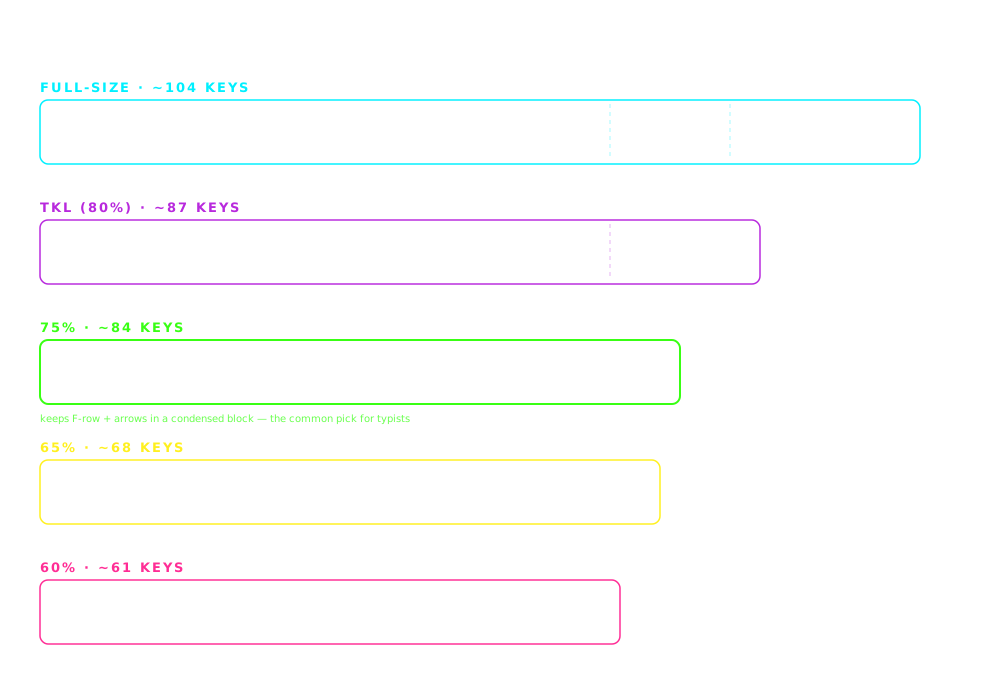
Keyboard form factors compared to scale: full-size (~44 cm, ~104 keys), TKL (~36 cm, ~87 keys), 75% (~32 cm, ~84 keys), 65% (~31 cm, ~68 keys) and 60% (~29 cm, ~61 keys)
Widths drawn to scale. The layout column in the comparison table below uses these size names.

The picks

The 7 best keyboards for back-to-school shoppers

#1

Redragon K552

~$30TIGHTEST BUDGET

The cheapest mechanical keyboard worth buying at back-to-school prices. Clicky Outemu Blue switches (loud โ€” home use only), TKL layout, wired. If you're gifting a first mechanical keyboard to a middle or high school student who studies at home, this is the entry point.

Pros

  • +Under $30 โ€” cheapest quality mechanical keyboard
  • +TKL layout โ€” arrows + F-keys, no numpad bulk
  • +Metal top plate โ€” surprisingly durable for the price
  • +Punchy tactile feedback for typing practice

Cons

  • โˆ’Blue switches too loud for dorms, libraries, shared rooms
  • โˆ’Wired only (fixed non-removable cable)
  • โˆ’Non-standard bottom row limits future keycap upgrades

Best for: First mechanical keyboard, home-only use, tight budget parents gifting a student

#2

Keychron C3 Pro

~$35BEST BUDGET HOT-SWAP

Keychron quality at back-to-school price. Hot-swappable switches (upgrade later without buying a new keyboard), smoother Gateron switches, real build. $5 more than the K552 and dramatically better long-term. If you can spend $35, get this over the K552.

Pros

  • +Hot-swap sockets โ€” swap switches without soldering
  • +Smoother Gateron switches (vs Redragon's Outemu)
  • +Real build quality from an established brand
  • +TKL layout with function keys and arrows

Cons

  • โˆ’Wired only
  • โˆ’TKL is larger than 75% or 65% โ€” takes more desk space

Best for: Students who want Keychron quality but can't stretch to K2 pricing

#3

Aula F75

~$40BACK-TO-SCHOOL SWEET SPOT

The single best value on this list. 75% layout with arrows retained (essential for essay editing), gasket-mounted for quieter typing than most budget boards, hot-swappable for future switch experiments. Quieter than the K552 and better build quality โ€” dorm-appropriate straight out of the box.

Pros

  • +Gasket-mounted โ€” softer and quieter than most budget boards
  • +Hot-swap sockets for experimenting with switches
  • +75% layout โ€” arrows retained for editing
  • +Pre-lubed linear switches feel smooth

Cons

  • โˆ’Wired only
  • โˆ’Aula brand less established than Keychron / Redragon (but growing fast)

Best for: College students wanting mechanical feel with roommate-safe noise

#4

Royal Kludge RK68

~$50BEST 65% WIRELESS UNDER $50

65% wireless mechanical for under $50. Compact enough for tiny dorm desks and backpack transport between class and coffee shop. Wireless Bluetooth pairs with laptop, tablet, and phone. The best wireless option in the sub-$60 range.

Pros

  • +Wireless (Bluetooth) under $50
  • +65% layout โ€” arrows retained, tiny footprint
  • +Hot-swap sockets included
  • +Multi-device pairing (up to 3 devices)

Cons

  • โˆ’Battery life shorter than premium wireless boards
  • โˆ’65% takes some getting used to โ€” no function row

Best for: Laptop-based students, mobile study sessions, small dorm desks, coffee-shop typists

#5

Royal Kludge RK84

~$65K2 ALTERNATIVE

The Keychron K2 alternative for $15 less. 75% layout with arrows and function keys, wireless Bluetooth + wired USB-C, hot-swap, RGB backlighting. If you want K2 features without paying K2 prices, this is the closest match at back-to-school pricing.

Pros

  • +Wireless (Bluetooth) + wired USB-C fallback
  • +75% layout โ€” arrows + function row
  • +Hot-swap sockets included
  • +Multi-device pairing for laptop + tablet + phone

Cons

  • โˆ’Build quality slightly below Keychron K2
  • โˆ’Bluetooth pairing occasionally finicky on first setup

Best for: Students who want Keychron K2 features but need to keep the total under $70

#6

Keychron K2

~$80PREMIUM STUDENT / GIFT PICK

The keyboard parents buy when they want the gift to last through all four years of college and beyond. Best-in-class wireless mechanical experience, Mac + PC compatibility, hot-swappable for future switch upgrades. This is the most-recommended back-to-school mechanical keyboard for a reason.

Pros

  • +Best-in-class 75% wireless mechanical experience
  • +Mac + PC keycaps included (works with both)
  • +Hot-swap sockets โ€” upgrade switches later
  • +5+ year expected longevity โ€” grows with the student

Cons

  • โˆ’Higher price than budget picks
  • โˆ’May be overkill for casual users

Best for: Parents gifting a lasting purchase, students who plan to keep the keyboard 5+ years

#7

Keychron Q3 (Premium Gift)

~$150PARENTAL SPLURGE

When the parent budget stretches to $150 and the intent is a 10-year investment. Full aluminum body, gasket-mounted (premium sound), hot-swap, per-key RGB, QMK/VIA support for full customization. This is heirloom-quality build at a back-to-school gift price. Overkill for many, perfect for the right student.

Pros

  • +Full aluminum construction โ€” 10+ year lifespan
  • +Gasket-mounted โ€” best-in-class sound + feel
  • +QMK/VIA support for advanced customization
  • +Hot-swap for switch experimentation

Cons

  • โˆ’Wired only (no wireless variant at TKL size)
  • โˆ’Heaviest keyboard on this list โ€” not backpack-friendly
  • โˆ’Steepest price on this list

Best for: Serious students in coding / writing / design who will spend 8+ hours daily typing for years

Compare

Side-by-side comparison

KeyboardPriceWireless
Redragon K552~$30No
Keychron C3 Pro~$35No
Aula F75~$40No
Royal Kludge RK68~$50Yes
Royal Kludge RK84~$65Yes
Keychron K2~$80Yes
Keychron Q3 (Premium Gift)~$150No

Switch guide

Linear vs tactile vs clicky โ€” 10-second version

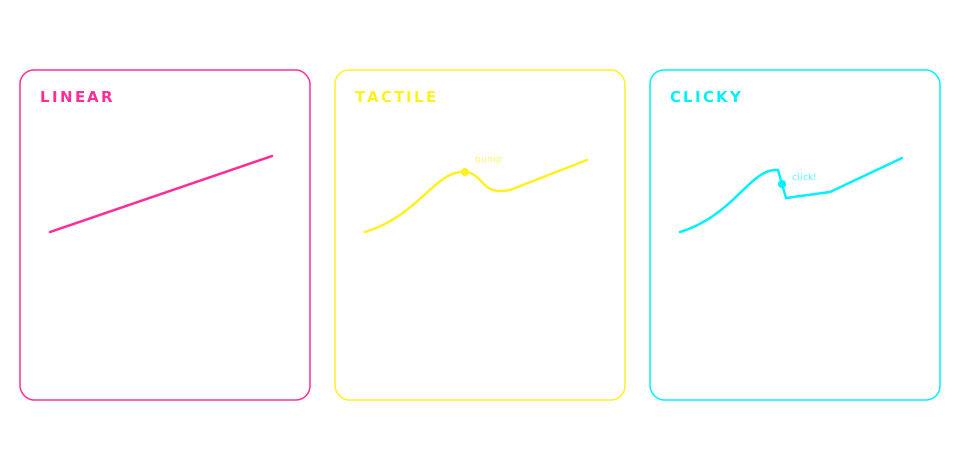
Mechanical switch types compared: linear switches feel smooth and are the quietest, tactile switches add a feelable bump and are the most popular for typing, clicky switches add an audible click and are the loudest
Generalized by switch family โ€” individual switches vary. When a pick above lists Brown switches, that's the tactile column.

Frequently asked

Common questions

What is the best mechanical keyboard for back to school 2026?+
For back-to-school 2026, the best all-around mechanical keyboard is the Aula F75 at ~$40 โ€” gasket-mounted for dorm-friendly noise, 75% layout with arrows for essay editing, and hot-swap sockets that let you upgrade switches later. For parents gifting a longer-lasting purchase, the Keychron K2 at ~$80 is worth the stretch and typically lasts through all four years of college. For the tightest budget under $30, the Redragon K552 works for home-only use.
Is a mechanical keyboard worth buying for back to school?+
Yes. Mechanical keyboards last 5-10 years vs 1-2 years for the membrane keyboards that come with pre-built desktops. A $35 mechanical keyboard like the Keychron C3 Pro is dramatically better than the $10 membrane most college kids inherit, and it lasts through all four years of college. The typing improvement (crisper feedback, less finger fatigue, faster average WPM) matters over thousands of pages of notes and essays.
What is the best cheap back-to-school keyboard under $50?+
Under $50, the three best back-to-school mechanical keyboards are: Aula F75 (~$40) for best all-around value with dorm-quiet gasket mounting, Keychron C3 Pro (~$35) for best budget hot-swap, and Royal Kludge RK68 (~$50) for the cheapest wireless mechanical. If you're stuck between them, the Aula F75 is the sweet spot for most students.
What keyboard should I get my college kid for back to school?+
For a first-year college student, the Keychron K2 at ~$80 is the most-gifted mechanical keyboard for back-to-school and typically lasts through all four years. It's wireless, Mac + PC compatible, has hot-swap sockets for future upgrades, and the 75% layout fits small dorm desks. If your budget is tighter, the Aula F75 at ~$40 delivers 85% of the K2 experience for half the price. Both are dorm-friendly noise levels.
When is the best time to buy a back-to-school keyboard?+
The back-to-school shopping window runs from mid-July through Labor Day (early September). Prices are competitive because brands are competing for parent spending โ€” mechanical keyboards typically hit their lowest prices of the year during this window. If you can, watch prices for 1-2 weeks and pounce when your target keyboard hits a price you're comfortable with. Prices climb again after Labor Day and don't drop meaningfully until Black Friday.
Are wireless keyboards worth it for college students?+
Wireless is convenient but not required. Wireless keyboards work with laptops, tablets, and phones without cable management โ€” nice for tight dorm desks and multi-device workflows. But they add $20-30 to the cost vs wired equivalents. If your budget is under $50, prioritize a good wired mechanical (Aula F75) over a wireless membrane keyboard. If budget is $50+, wireless mechanical becomes an option (Royal Kludge RK68 or RK84). For laptop-first students who study across dorm, library, and class, wireless is worth the premium.
What size keyboard fits a small dorm desk?+
65% and 75% layouts are best for small dorm desks. 65% (like Royal Kludge RK68) is the smallest layout that keeps arrow keys โ€” saves 40% of the desk footprint vs full-size. 75% (Keychron K2, Aula F75, Royal Kludge RK84) keeps arrows plus function row. TKL (Keychron C3 Pro, Keychron Q3) drops the numpad but is still relatively large. Full-size is only worth it if you frequently enter numbers for spreadsheet-heavy coursework.
Which switch type is quiet enough for a shared dorm room?+
Brown switches (tactile, moderate volume) are the loudest that's still dorm-appropriate. Red switches (linear, quiet) are quieter but have no tactile bump. Silent Brown and Silent Red switches with rubber dampeners are the quietest mechanical option โ€” nearly as quiet as membrane. Avoid Blue (clicky) switches for shared spaces โ€” they are loud enough to disturb roommates through walls. The Aula F75 with linear switches or Keychron K2 with Brown switches are both dorm-safe defaults.
Disclosure

As an Amazon Associate we earn from qualifying purchases. Picks on this page are research-based: chosen from published specs, long-term owner feedback, and what the mechanical keyboard community consistently recommends for back-to-school shoppers โ€” we have not hands-on tested every board listed. Prices update in real time on Amazon and may differ from any examples shown. Last updated 2026-08-03.