🎓

Under $50 · Prime Shippable

Best Mechanical Keyboards Under $50 — 2026 Picks That Actually Feel Good

Five under-$50 mechanical keyboards ranked by real typing feel, not Amazon review count. Every pick is Prime-shippable. From $30 (cheapest good option) to $50 (best wireless), one of these is the right board for you.

By Soexya Khatiwada · Updated 2026-08-03

Contains affiliate links — as an Amazon Associate, Kwerty earns from qualifying purchases at no cost to you. Full disclosure

Short answer

If your budget is $50 or less, the mechanical keyboard to buy is the Aula F75 the sweet spot at $40 — gasket-mounted for softer/quieter typing (a feature usually reserved for $80+ boards), pre-lubed linear switches out of the box, 75% layout with arrows AND function keys, and hot-swap sockets so you can upgrade switches later. If we could pick only ONE keyboard under $50, this would be it.

Live · Now

Today's Amazon Picks

Prices and stock update continuously on Amazon. Tap any product below to jump straight to today's live Amazon page.

SEE ALL PICKS
Verified Amazon links In-stock checked Prime-eligible picks

As an Amazon Associate we earn from qualifying purchases.

Buying criteria

What makes a keyboard good for buyers under $50

Hard budget: $50 or under, Prime-shippable

Every keyboard on this list is under $50 on Amazon at the time of publish, and all ship via Prime for two-day delivery. If a pick creeps over $50 due to price fluctuation, we swap it. The point of buying under $50 is finishing checkout without regret — no impulse-doubling into the $100 tier.

Actually mechanical, not marketing-mechanical

Amazon is full of "mechanical-style" keyboards under $50 that are actually rubber-dome membrane boards in a mechanical-looking chassis. Every keyboard here uses real mechanical switches (Outemu, Gateron, Content, or Aula pre-lubed linears). If it's on this list, the switches click, don't squish.

Picked with real typing data

These picks are the budget mechanical keyboard community's consistent favorites — the boards that keep earning recommendations from enthusiasts year after year, not the ones with the highest Amazon review counts or the biggest sponsorship budgets.

Layouts that fit small desks

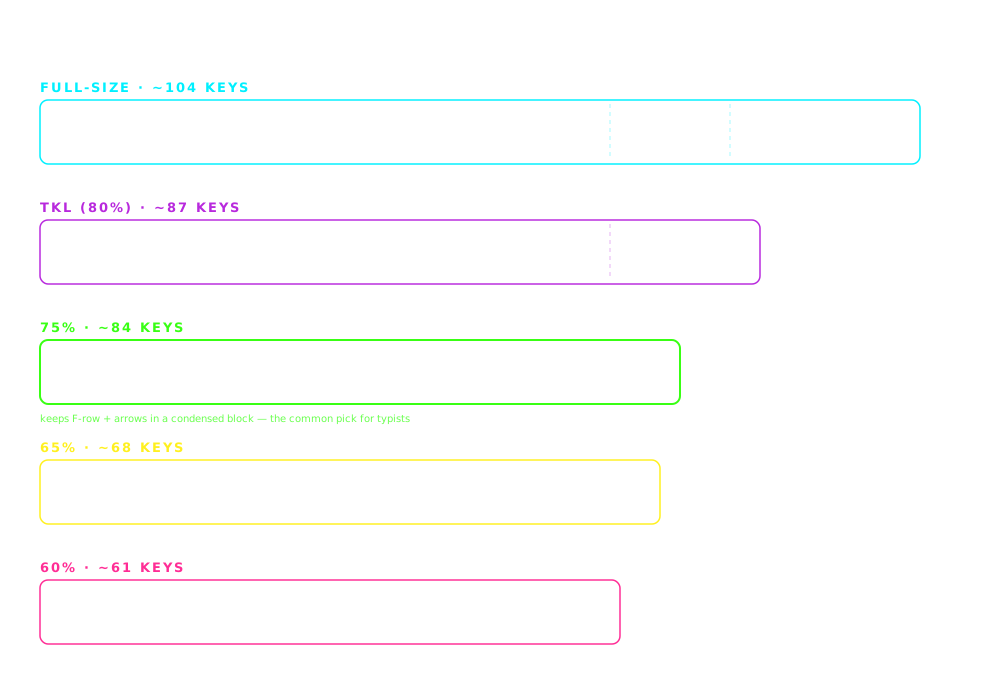
Under-$50 boards skew toward TKL and 75% layouts because full-size mechanical keyboards under $50 usually cut corners on switches. That's fine — TKL and 75% keep arrows and function keys while saving 30-40% desk space. Perfect for shared setups, dorm desks, or laptop-plus-external-keyboard workflows.

Size guide

Which layout size fits your desk?

Keyboard form factors compared to scale: full-size (~44 cm, ~104 keys), TKL (~36 cm, ~87 keys), 75% (~32 cm, ~84 keys), 65% (~31 cm, ~68 keys) and 60% (~29 cm, ~61 keys)
Widths drawn to scale. The layout column in the comparison table below uses these size names.

The picks

The 5 best keyboards for buyers under $50

#1

Redragon K552

~$30🔥 CHEAPEST WORTH BUYING

The single best mechanical keyboard you can buy for $30. Outemu Blue switches give unmistakable clicky feedback — perfect for feeling the difference from your old membrane keyboard. Metal top plate makes it feel more premium than the price suggests. If your budget is tight and you just want to feel mechanical typing, buy this today.

Pros

  • +Under $30 shipped via Prime — cheapest quality mechanical
  • +Metal top plate — feels more premium than the price
  • +TKL layout — arrows retained, no numpad bulk
  • +Punchy clicky feedback (dramatic upgrade from membrane)

Cons

  • Blue switches are LOUD — avoid for shared workspaces
  • Wired only with fixed cable
  • Non-standard bottom row limits future keycap swaps

Best for: First mechanical keyboard, home use, tight-budget buyers

#2

Keychron C3 Pro

~$35⭐ BEST HOT-SWAP UNDER $40

Keychron quality without Keychron pricing. Hot-swap sockets let you experiment with different switches later without buying a new keyboard — a rare feature under $40. Gateron switches feel smoother than Redragon's Outemu. For $5 more than the K552, you get real Keychron build quality plus upgrade potential.

Pros

  • +Hot-swap sockets — try different switches without soldering
  • +Smoother Gateron switches vs Outemu
  • +Real Keychron build quality (established brand)
  • +TKL layout with dedicated arrow cluster

Cons

  • Wired only
  • TKL bigger than 75%/65% budget options

Best for: Buyers who want to grow with their keyboard, mechanical enthusiasts starting out

#3

Aula F75

~$40🏆 BEST OVERALL VALUE

The keyboard that punches most above its price. Gasket-mounted for softer, quieter typing — a feature usually reserved for $80+ boards. 75% layout keeps arrows AND function keys. Pre-lubed linear switches feel smooth out of the box. If we could pick only ONE keyboard under $50, this would be it.

Pros

  • +Gasket-mounted — softer/quieter than most budget boards
  • +Pre-lubed linear switches (no post-purchase mods needed)
  • +Hot-swap sockets for future switch experiments
  • +75% layout — arrows + function row + compact footprint

Cons

  • Wired only
  • Aula brand less well-known than Keychron/Redragon

Best for: Anyone under $50 who wants the best typing feel, apartment/office use where noise matters

#4

Whalices 52 (Keyboard + Mouse Bundle)

~$35💰 BEST BUNDLE DEAL

Wireless keyboard + matching wireless mouse for $35 shipped. Not the best pure keyboard on this list, but the value proposition is unbeatable if you also need a mouse. Slim low-profile design works well with laptop-plus-external-keyboard setups. Grab this if you're setting up a full desk from scratch.

Pros

  • +Wireless keyboard AND wireless mouse under $40 total
  • +Slim, low-profile — works with laptops on the same surface
  • +Both devices battery-powered, no cable clutter

Cons

  • Membrane keyboard, not true mechanical
  • Build quality reflects the bundle pricing

Best for: First-time desk setups, back-to-school buyers, anyone who needs a mouse too

#5

Royal Kludge RK68

~$50📶 BEST WIRELESS UNDER $50

The only genuinely good wireless mechanical keyboard under $50. 65% layout is tiny — perfect for cramped desks or backpack transport. Bluetooth pairs with laptops, tablets, and phones. Hot-swap sockets included. RGB lighting is a nice touch. For $50, the feature list is remarkable.

Pros

  • +Wireless (Bluetooth) at $50 — rare in this price range
  • +65% layout — tiny footprint, arrows retained
  • +Hot-swap sockets for switch upgrades
  • +RGB backlighting included

Cons

  • 65% takes adjustment — no dedicated function row
  • Battery life shorter than premium wireless boards
  • Bluetooth pairing occasionally requires re-pairing

Best for: Laptop-based work, small desks, buyers who won't settle for wired at any price

Compare

Side-by-side comparison

KeyboardPriceWireless
Redragon K552~$30No
Keychron C3 Pro~$35No
Aula F75~$40No
Whalices 52 (Keyboard + Mouse Bundle)~$35Yes
Royal Kludge RK68~$50Yes

Switch guide

Linear vs tactile vs clicky — 10-second version

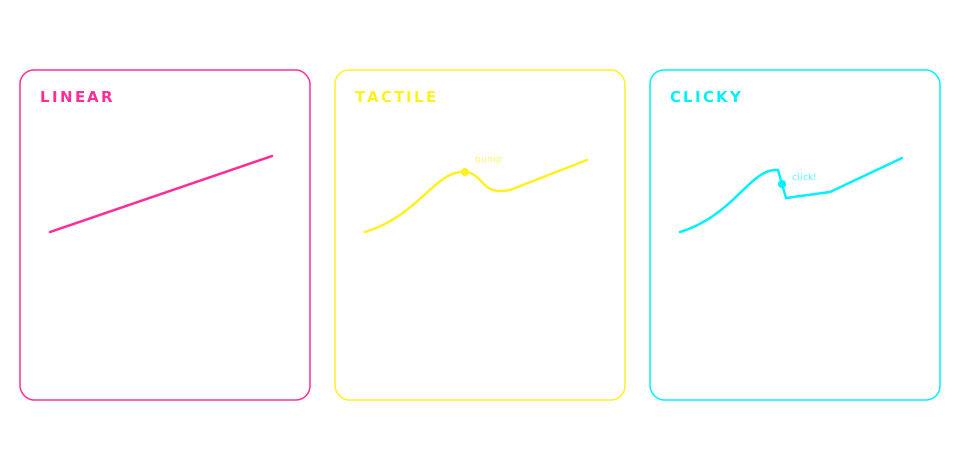
Mechanical switch types compared: linear switches feel smooth and are the quietest, tactile switches add a feelable bump and are the most popular for typing, clicky switches add an audible click and are the loudest
Generalized by switch family — individual switches vary. When a pick above lists Brown switches, that's the tactile column.

Frequently asked

Common questions

What is the best mechanical keyboard under $50 in 2026?+
The best mechanical keyboard under $50 in 2026 is the Aula F75 at ~$40. It's the only keyboard under $50 with gasket-mounted construction (a feature usually reserved for $80+ boards), pre-lubed linear switches, hot-swap sockets, and a 75% layout that keeps arrows and function keys. If your budget is $30 or under, the Redragon K552 is the cheapest mechanical worth buying. If you need wireless under $50, the Royal Kludge RK68 is the only good option in that price bracket.
Is a $30 mechanical keyboard actually good enough for typing?+
Yes. The Redragon K552 at ~$30 is dramatically better for typing than any membrane keyboard at any price. Real mechanical switches (even budget Outemu Blues) give faster key travel, more consistent actuation, and better key feedback than membrane switches — this directly translates to typing accuracy and speed. The tradeoff at $30: no wireless, no hot-swap upgrade path, and the Blue switches are loud. If you can spend $35-40 instead, the Keychron C3 Pro or Aula F75 are significantly better values.
Which mechanical keyboard under $50 has the fastest Amazon shipping?+
Every keyboard on this page is Prime-shippable via Amazon Prime — that means two-day delivery for Prime members. The Redragon K552, Keychron C3 Pro, Aula F75, and Royal Kludge RK68 all typically ship from Amazon US warehouses within 24 hours of order. If shipping speed is the priority, filter your Amazon results by 'Prime Eligible' and pick whichever of these has the earliest delivery estimate at your address.
Can I get a hot-swap mechanical keyboard under $50?+
Yes — three keyboards on this list have hot-swap sockets under $50: the Keychron C3 Pro (~$35), Aula F75 (~$40), and Royal Kludge RK68 (~$50). Hot-swap means you can pull out the pre-installed switches and drop in different ones without soldering — Kailh Box, Cherry MX, Gateron, Outemu 3-pin, and 5-pin all work. This future-proofs the keyboard: you can upgrade to premium switches for $30-40 later without buying a whole new board.
Is a $50 mechanical keyboard as good as a $150 one?+
Not in absolute terms, but the gap is smaller than you'd expect for typing. A $50 board like the Aula F75 has 80-90% of the typing feel of a $150 board — gasket mounting, decent switches, hot-swap. What you give up: premium keycaps (PBT vs the ABS on budget boards), wireless quality (though the RK68 does OK), aluminum vs plastic chassis, and RGB refinement. For a first mechanical keyboard or a budget-conscious upgrade, under-$50 is the smart entry point. You can always upgrade to $150+ once you know what you want.
What switches should I pick on an under-$50 mechanical keyboard?+
For general typing: Brown switches (tactile, moderate volume) if the board is used at home; Red switches (linear, quieter) if used in shared spaces. For gaming with typing on the side: Red or linear. Avoid Blue switches (clicky, LOUD) unless you type exclusively at home with the door closed. The Aula F75 comes with pre-lubed linears out of the box — smoothest option under $50 with no configuration needed. The Keychron C3 Pro lets you pick Red, Brown, or Blue at checkout.
Are cheap Amazon mechanical keyboards worth it or should I save up for Keychron K2?+
It depends on your goals. If you've never used a mechanical keyboard, buy a $30-40 board first (Redragon K552 or Aula F75) — you'll learn what you like and don't like before spending $80. If you already know you want wireless, Mac support, and a keyboard that will last 5+ years, save up for the Keychron K2 at ~$80. The Aula F75 at $40 is 80% of the K2 experience for half the price — a legitimately great option, not a compromise.
Do these under-$50 keyboards work with Mac?+
The Redragon K552, Keychron C3 Pro, and Aula F75 (wired) work with Mac out of the box — plug in the USB-C cable and macOS recognizes them as generic USB keyboards. Key caps show PC labels (Windows key instead of Command) but functionality is identical — you can remap Command/Option in System Preferences. The Royal Kludge RK68 pairs via Bluetooth with Mac and includes a Mac-specific keycap set. For a Mac-optimized under-$50 keyboard, the Keychron C3 Pro is the safest pick because Keychron makes Mac keycap sets available separately.
Disclosure

As an Amazon Associate we earn from qualifying purchases. Picks on this page are research-based: chosen from published specs, long-term owner feedback, and what the mechanical keyboard community consistently recommends for buyers under $50 — we have not hands-on tested every board listed. Prices update in real time on Amazon and may differ from any examples shown. Last updated 2026-08-03.